
October 29, 2025
AIO Sandbox: An Integrated and Customizable Sandbox Environment for AI Agents
Background
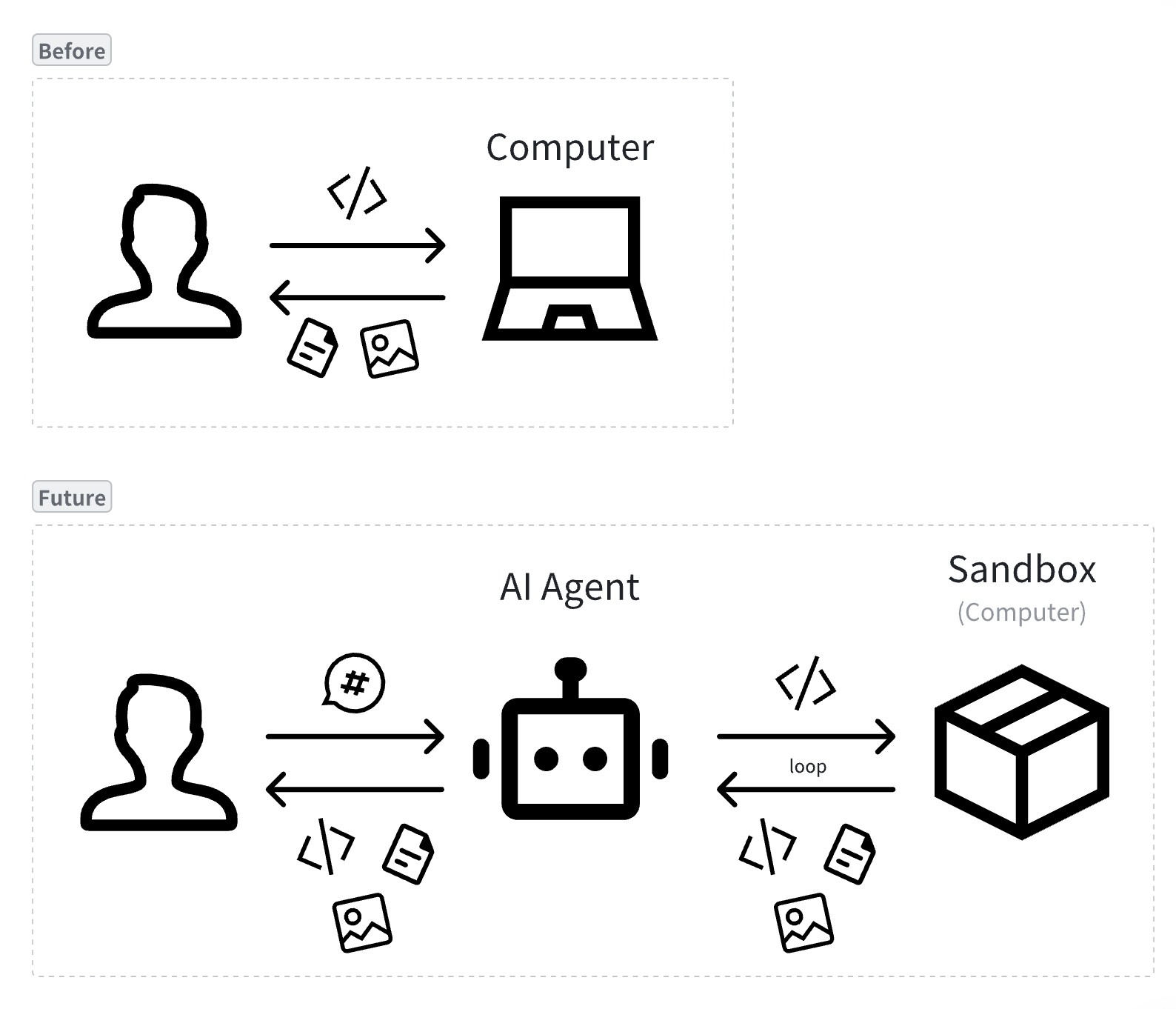
As LLMs continue to evolve, AI application forms have undergone three generational shifts:
- Chatbot: Conversational interaction, answering questions
- Copilot: Collaborative assistance, improving efficiency
- Agent: Autonomous execution, completing tasks
Agents can autonomously perceive their environment, plan steps, and invoke tools, enabling them to operate computers like humans: automatically browsing web pages to collect information, generating and running code to analyze data, executing system commands to manage files, and even completing complex multi-step operations through visual interfaces. This capability allows Agent deliverables to approach or even exceed human professional standards.
Pain Points
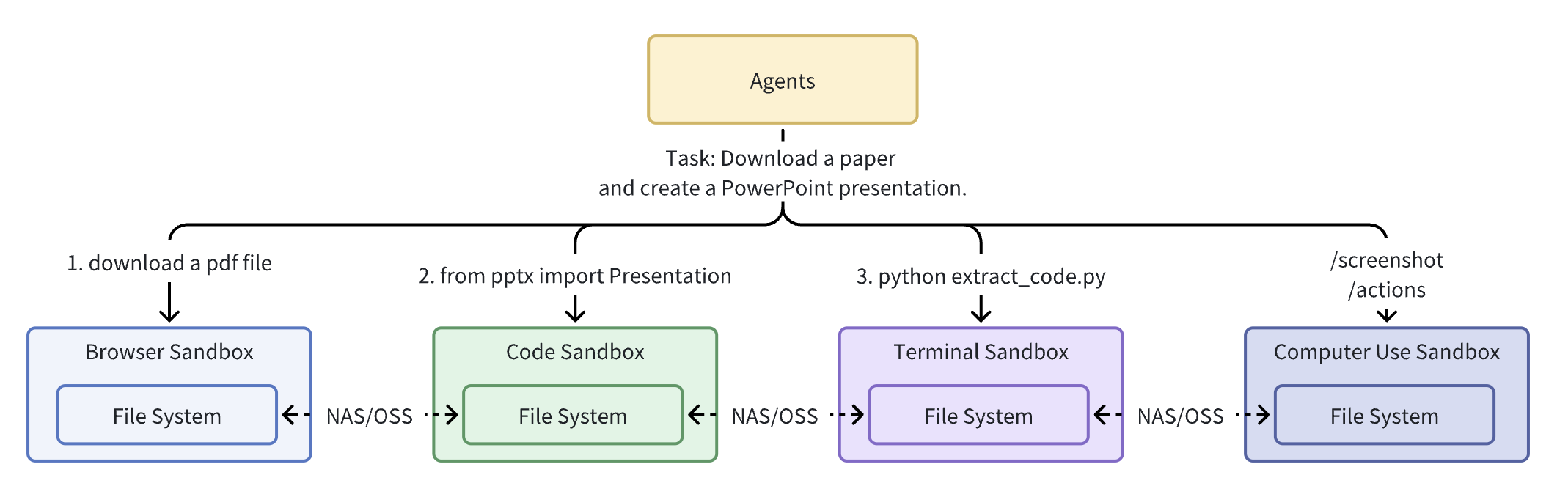
- 🧩 Environment Fragmentation: Multiple single-function sandboxes (like E2B for code execution, Browserbase for browsers) force Agents to transfer data across sandboxes via NAS/OSS, increasing latency and complexity. For example: a deep research Agent completing 'convert a paper into a PPT' needs to exchange dozens of intermediate files (JSON configs, chart images, preview screenshots, etc.) across multiple sandboxes, adding complexity and overhead to the entire Agent system.
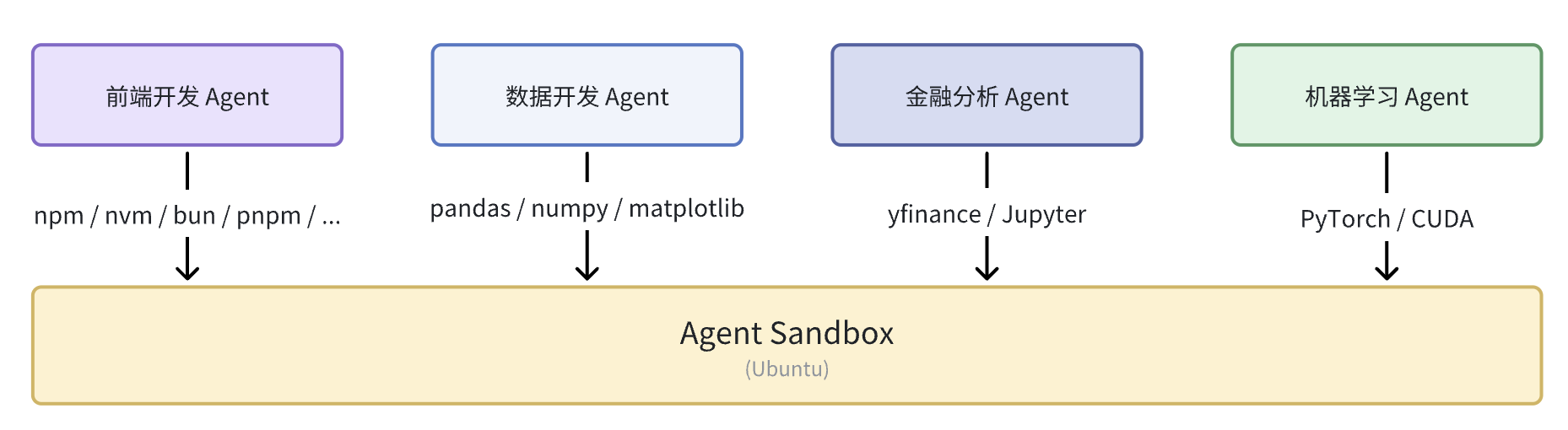
- 🎁 Difficult Customization: Different types of Agents require different pre-installed tech stacks. Traditional sandboxes provide unified pre-installed environments that cannot meet all Agents' personalized needs.
- 🔒 Security Isolation Challenges: Need to give Agents real system capabilities (network, files, browser, GPU) while maintaining strong isolation to prevent unauthorized access and data leaks.
- 🖥️ Difficult Visual Interaction: Complex Agent tasks require human takeover, functional sandboxes need to integrate VNC, Terminal, VSCode to maintain consistent experience. Resolution switching, screenshots, and GUI visual operations.
- 🌐 Browser Environment Complexity: Anti-automation and fingerprint risk control, CDP instability, inadequate proxy support with username/password, missing GUI operations.
A well-configured computer can significantly improve human work efficiency; similarly, a powerful sandbox environment can also improve Agent task quality and execution speed.
Introduction
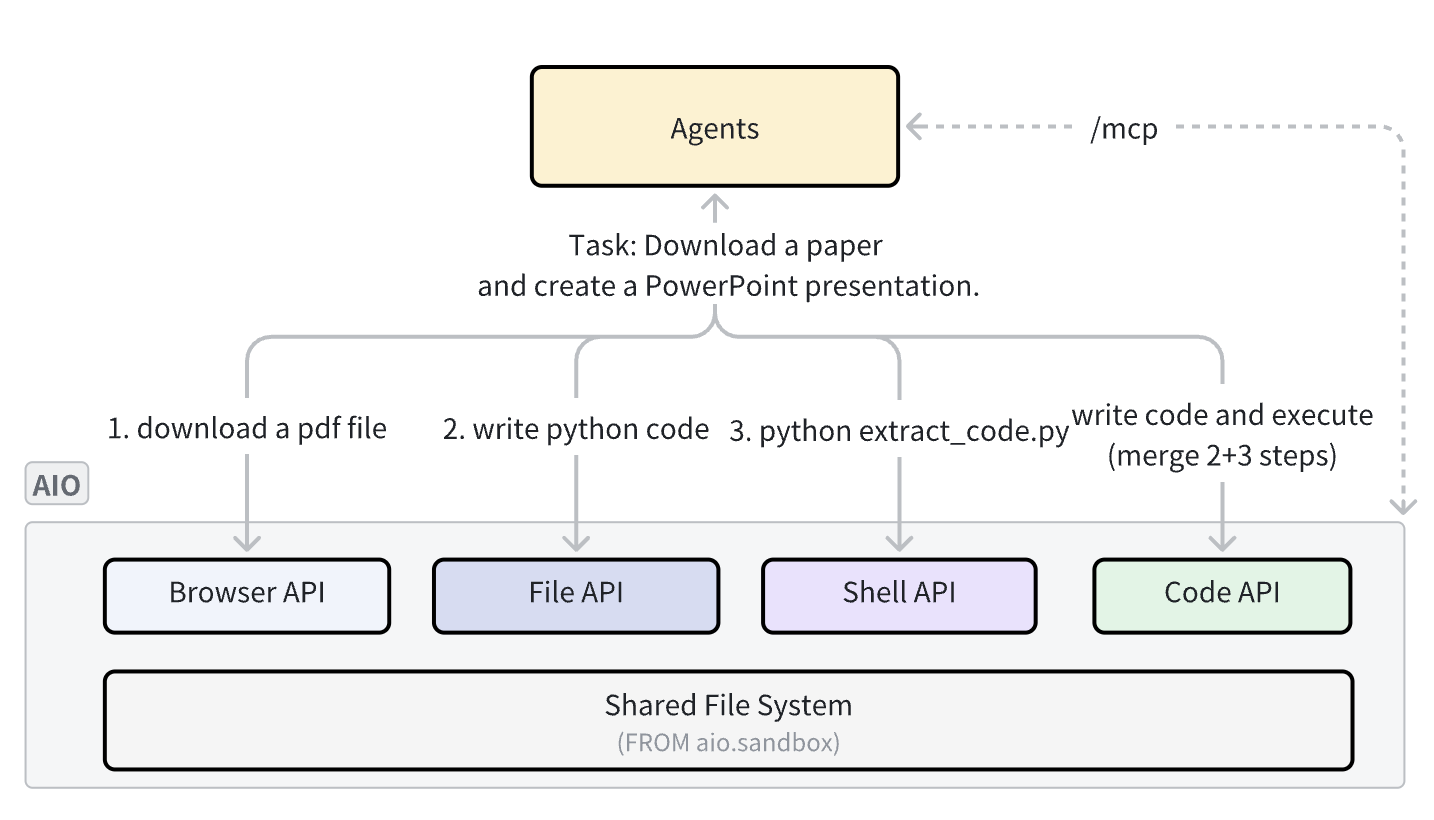
One-sentence introduction: AIO Sandbox integrates browser, code execution, terminal, visual takeover, forward and reverse proxy, MCP, authentication and other basic functions in a single sandbox, allowing environment customization based on needs, enabling different Agents to "complete tasks more efficiently in a unified environment container".

-
Website: sandbox.agent-infra.com
-
Github: github.com/agent-infra/sandbox
Features
- 📦 Out-of-the-box: Connect directly to sandbox capabilities via
/mcpprotocol, also providing API / SDK for customizing sandbox toolsets. - 🚀 Second-level Startup: Full sandbox service startup completes in seconds, reaching millisecond-level after pre-caching/cold start.
- 🌈 Customizable: Agents in various vertical scenarios need domain-specific tools and dependencies; AIO provides a unified image base, supporting on-demand expansion with convention-based routing and service configuration.
- 🌐 Browser: Integrates Web Infra's RS lightweight kernel, providing CDP, screenshots, pure visual GUI operations, and Proxy configuration.
- 🔄 Human Takeover: Provides browser VNC, Code Server, Terminal, supporting human takeover and debugging mid-task.
- 📡 Proxy and Forwarding: Supports forward proxy with authentication; maps
{port}-{domain}wildcard domains or/proxy|/absproxy/{port}paths to services inside the sandbox (convenient for preview/demo). - 🔒Security Authentication: JWT Bearer access control; provides Short-Lived Tickets for links that cannot carry Headers.

Examples
| Instruction | Replay | Screenshot |
|---|---|---|
| Help me design an interesting website to introduce sauropod dinosaurs from the Jurassic and Cretaceous periods for elementary school children. I want the website to be cartoon-styled. | Replay | 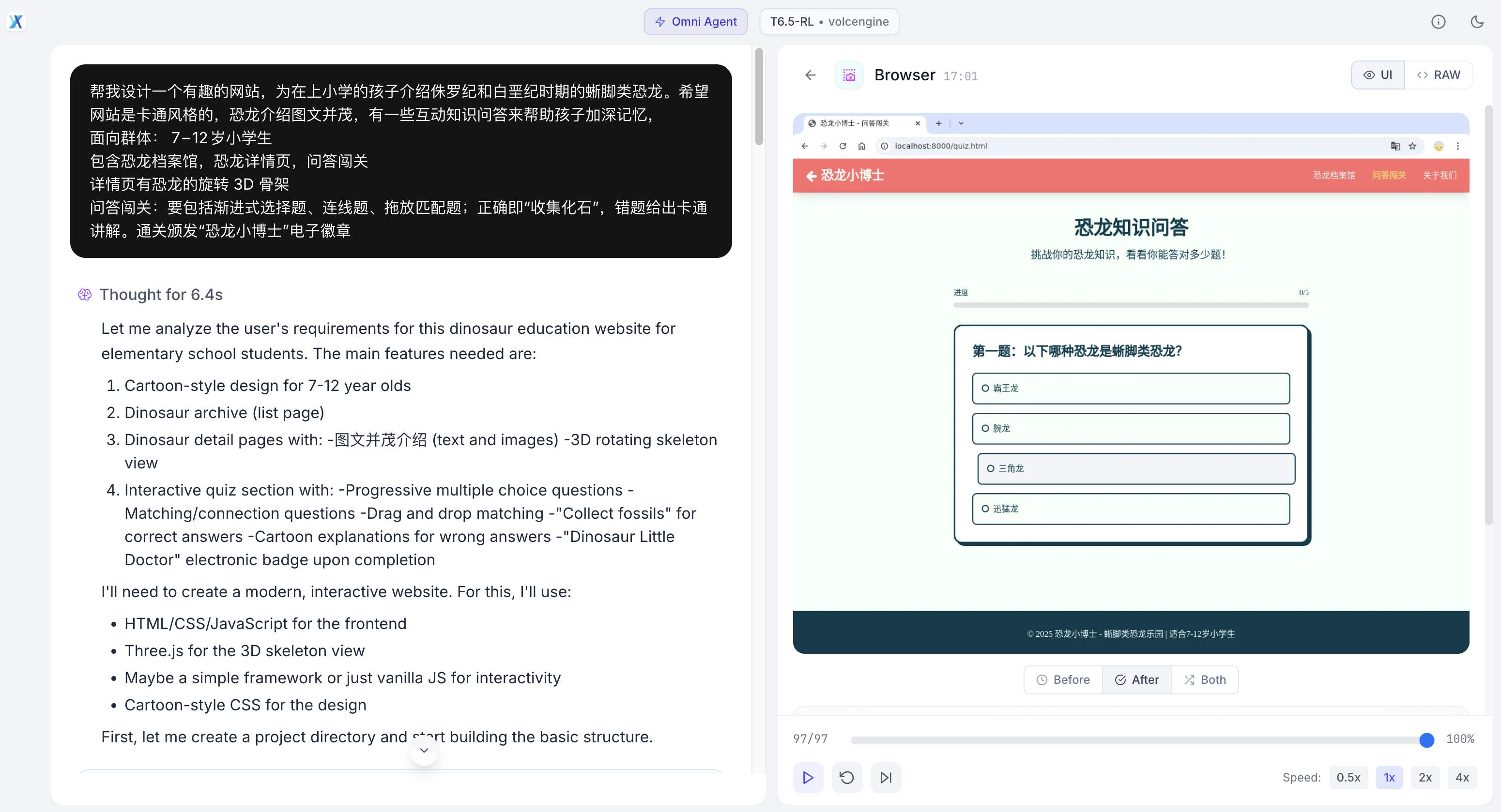 |
| Search for news about ByteDance's Seed 1.6 model, then write a modern-styled webpage and deploy it | Replay | 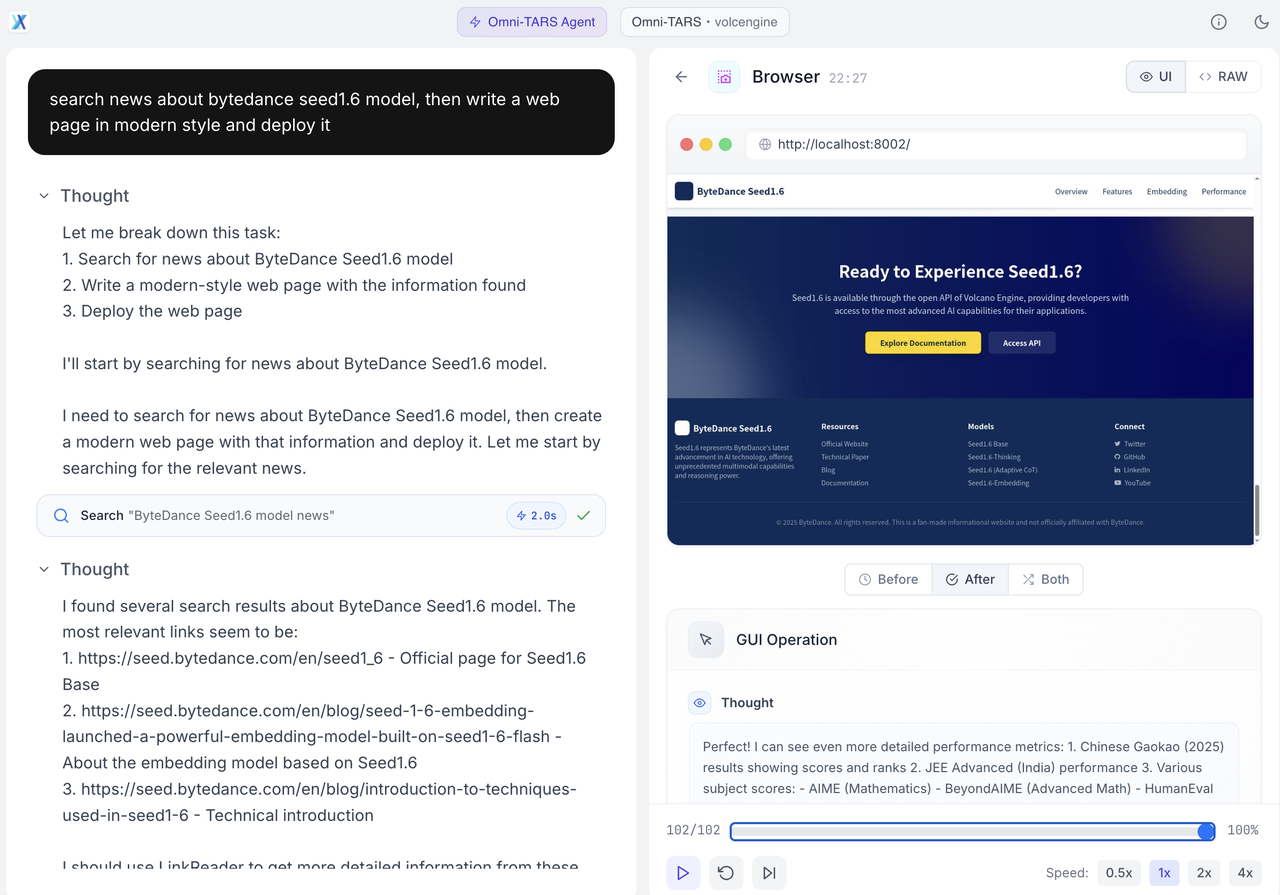 |
| Based on this OSWorld image, please search for the latest information on the internet and design a modern website for it. | Replay | 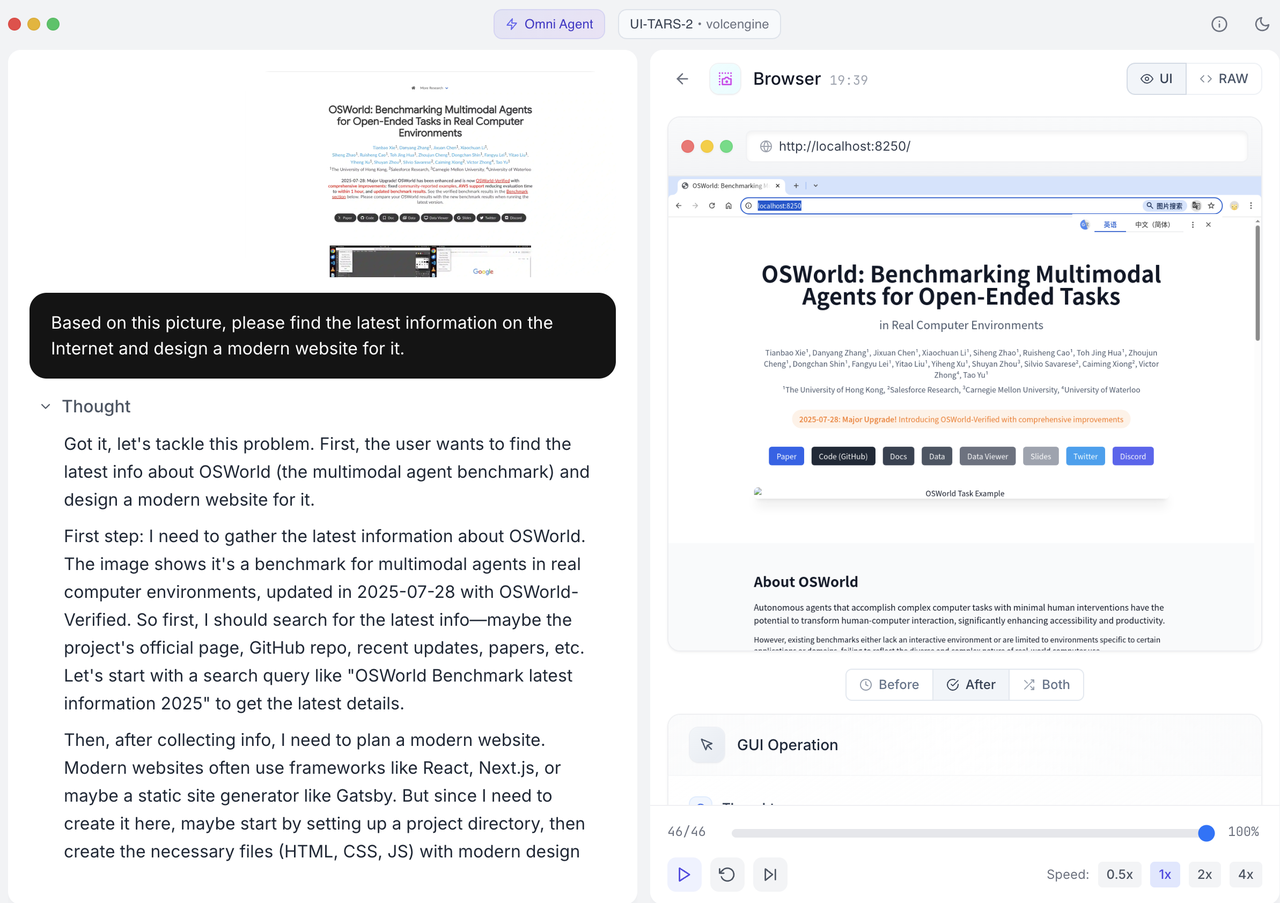 |
| Play Poki 2048 game | Replay | 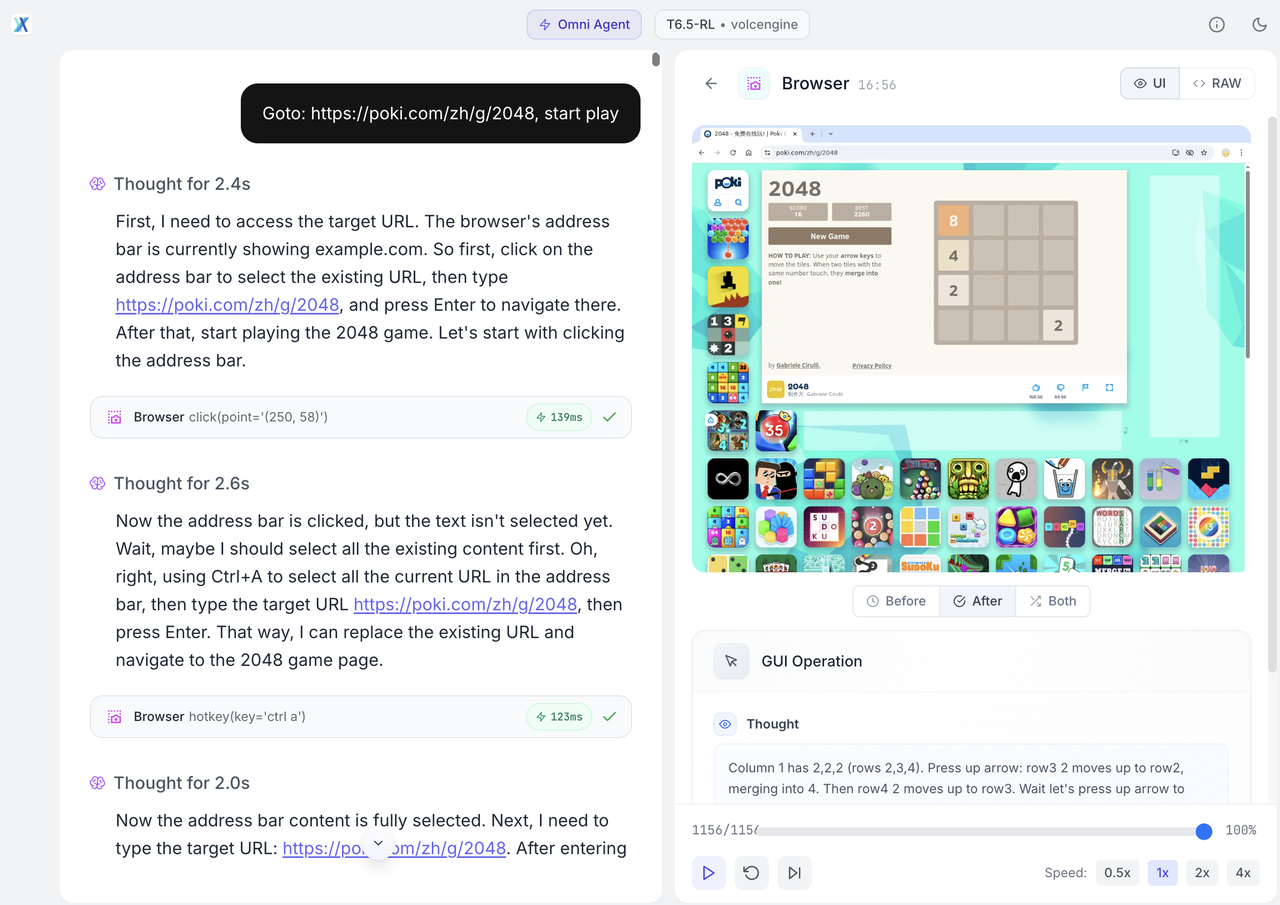 |
Quick Start
Cloud
One-Click Deploy All-in-One Sandbox Application--Function Service-Volcano Engine
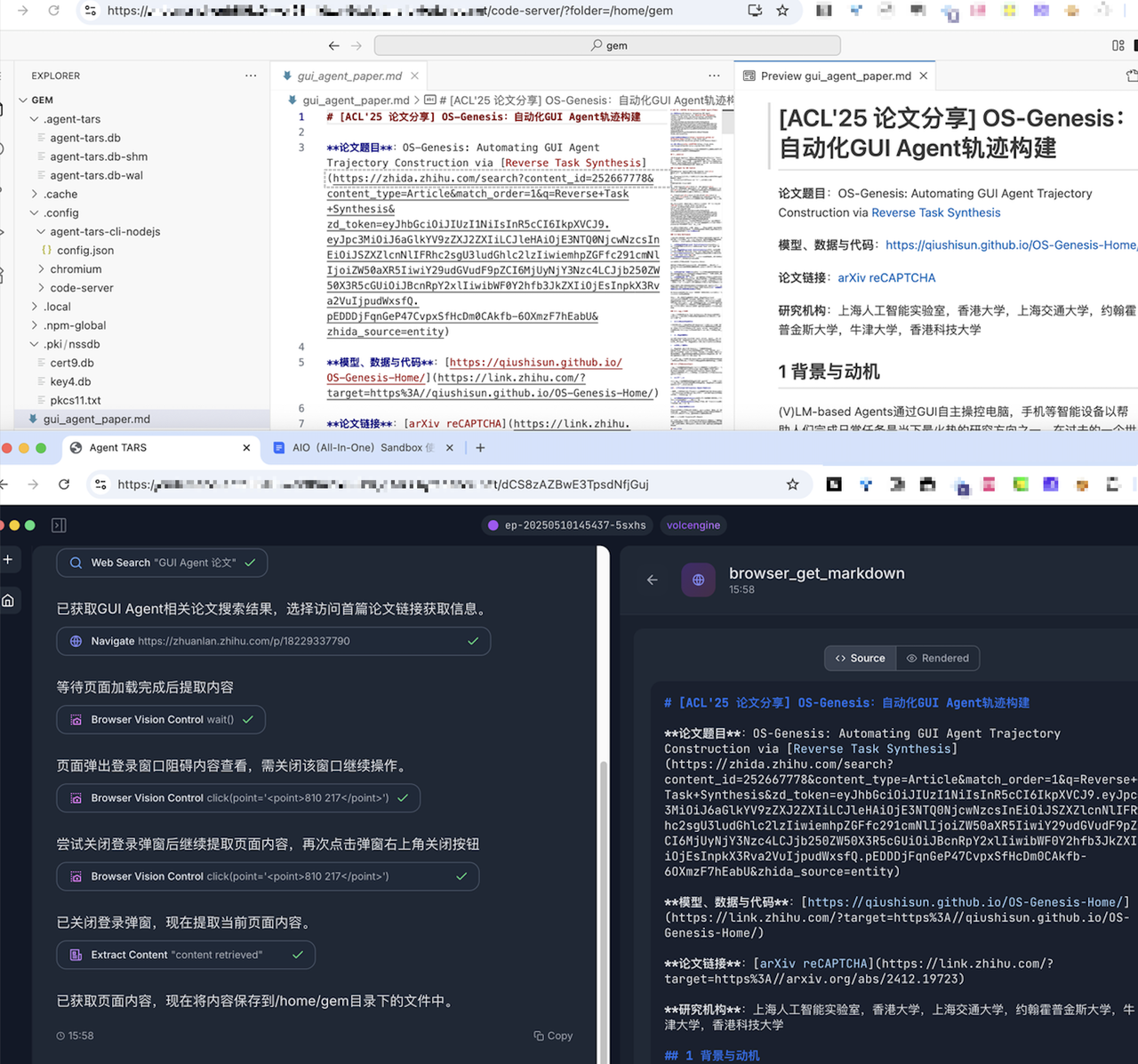
Local
Prerequisites: Install Docker, then start locally with one command:
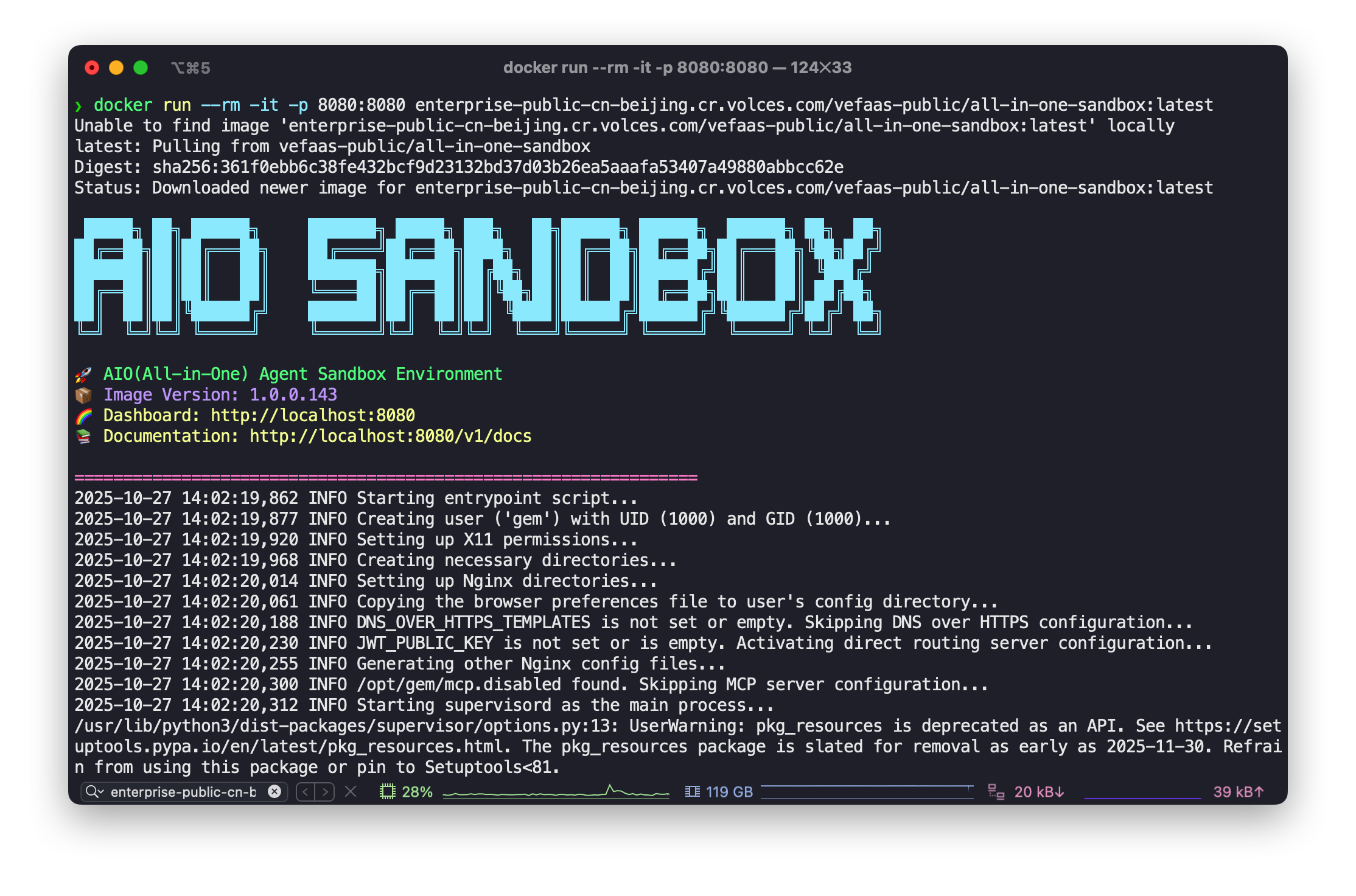
System Architecture
Overview
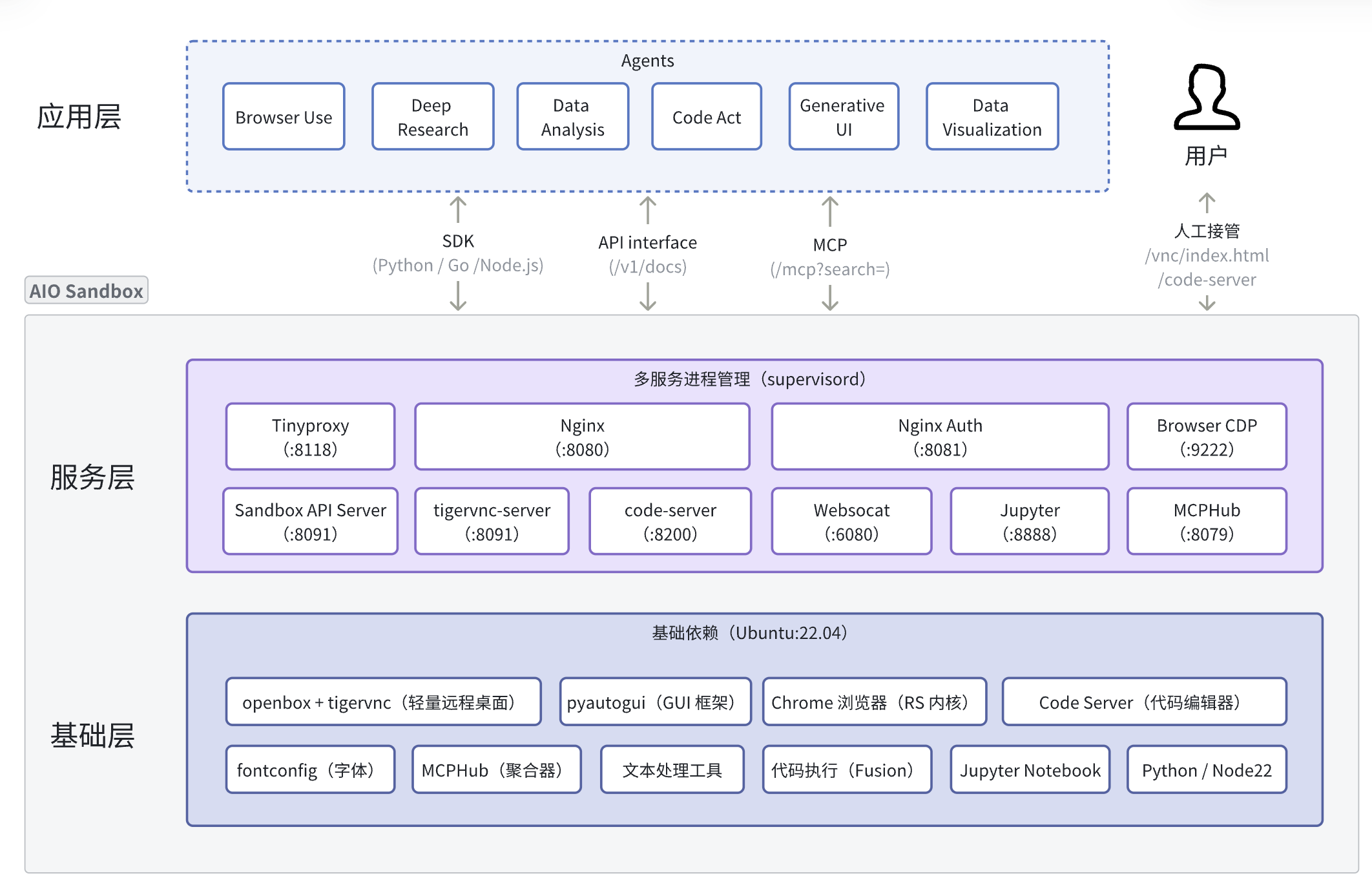
AIO Sandbox provides Agents with basic capabilities like Browser, File, Shell, Code, and offers extensibility to support developers in combining and customizing dedicated sandboxes based on Agent needs (such as AIO Sandbox for Mobile/Medical/Legal/Finance/Scientific Research).
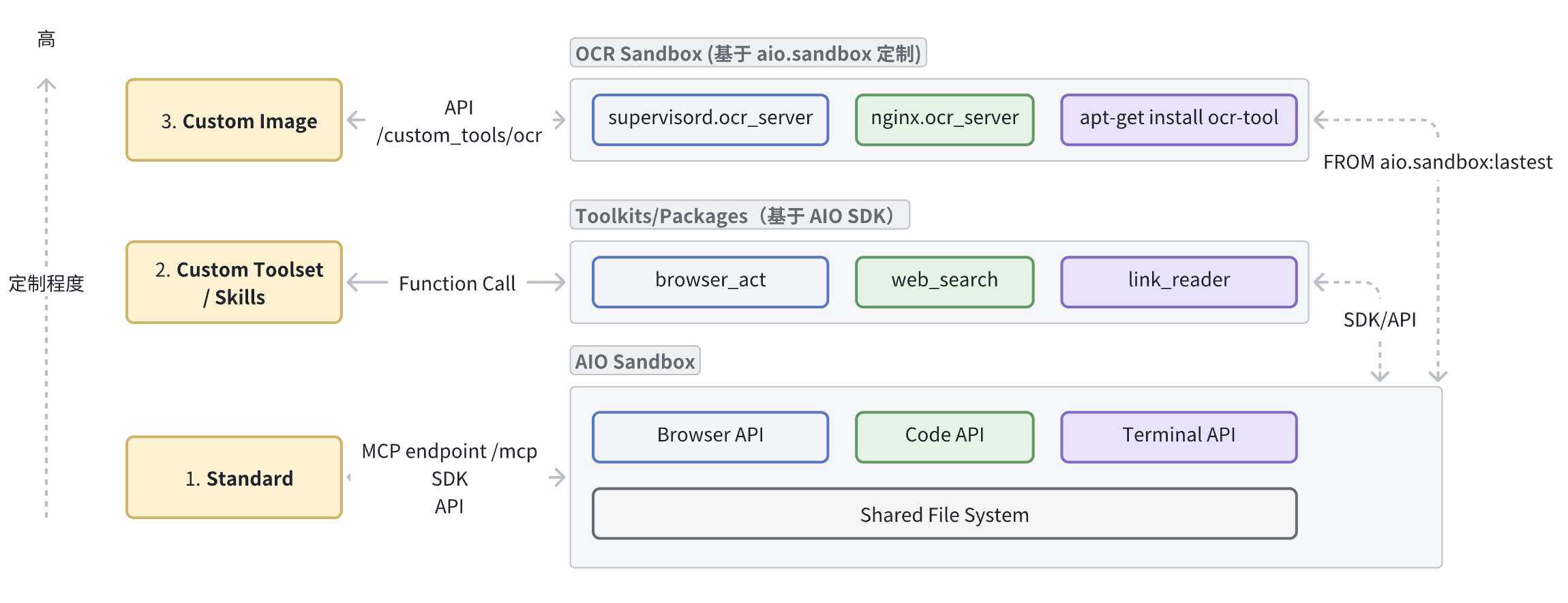
Sandbox customization levels increase progressively:
- Standard (Out-of-the-box): Plug-and-play for Agents via
/mcpendpoint, suitable for quick PoC Agent validation. - Custom Toolset (Tool/Skills Extension): Without modifying the image, add or orchestrate tools based on SDK/API (such as adding
web_search); also extend Skills to implement automated handling of specific sandbox tasks. - Custom Image: Based on
FROM aio.sandboxbase image, install specific dependencies (such as multimedia/image processing, etc.), mount custom services (e.g.,/custom_tools/ocrimage recognition).
Core Components
Browser
Browser environment for Agents, core is providing CDP and VNC, mainstream Browser Use frameworks can be used directly; AIO provides x11-based browser GUI visual operation interface, which can be combined with CDP for more efficient, lower risk-control Browser Use solutions.
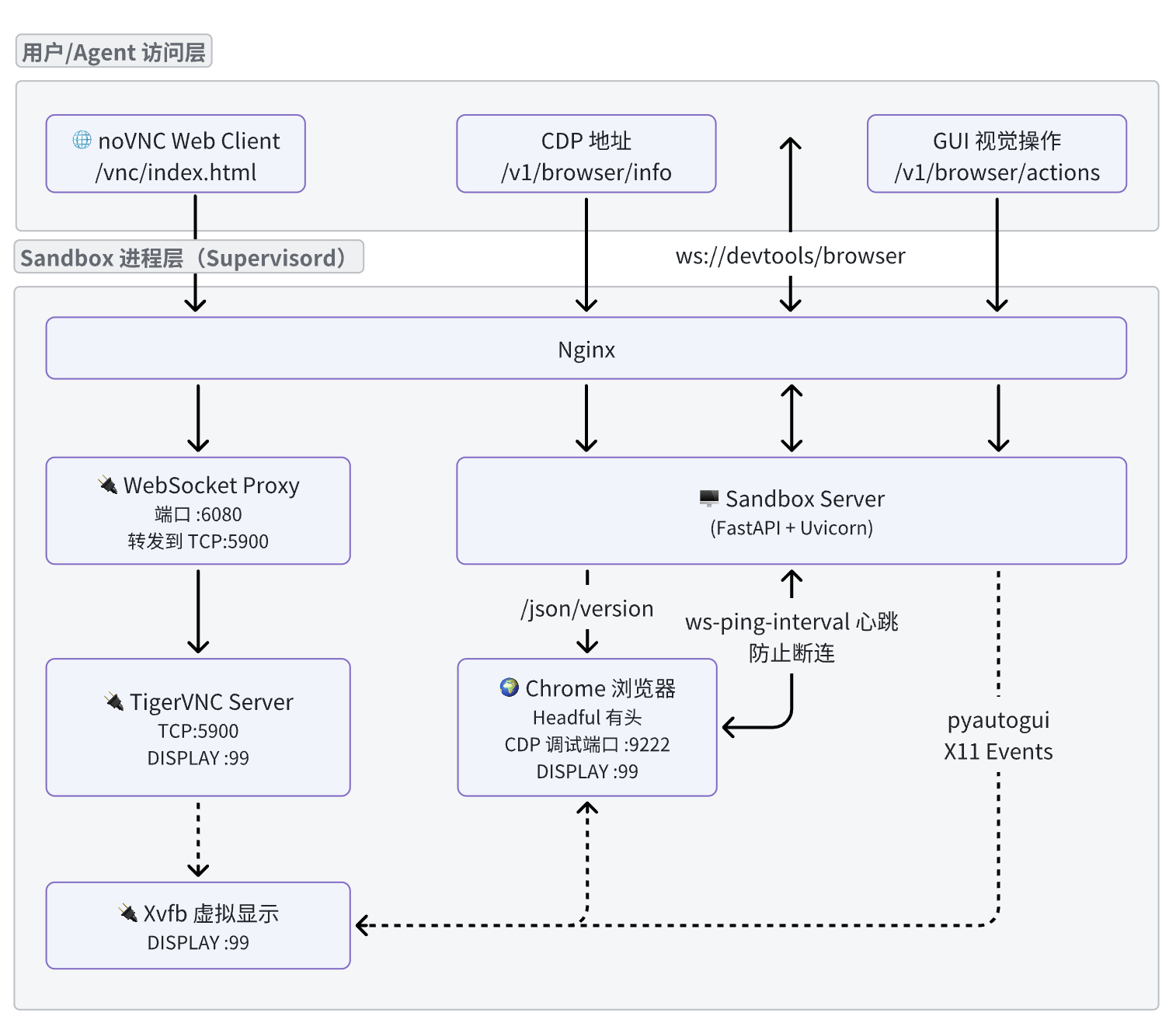
CDP
CDP (Chrome Devtools Protocol) is a protocol for communicating with Chrome or Chromium browsers, providing browser control APIs via WebSocket for navigation and loading, DOM manipulation, JS execution/debugging, network interception and simulation, screenshots and rendering, security and permissions, etc. For a more intuitive understanding, here's an example of using CDP to initiate a page navigation command:
Visit http://localhost:9222/json/version, where webSocketDebuggerUrl is the CDP address:
After establishing a WebSocket connection with CDP, you can execute browser commands:
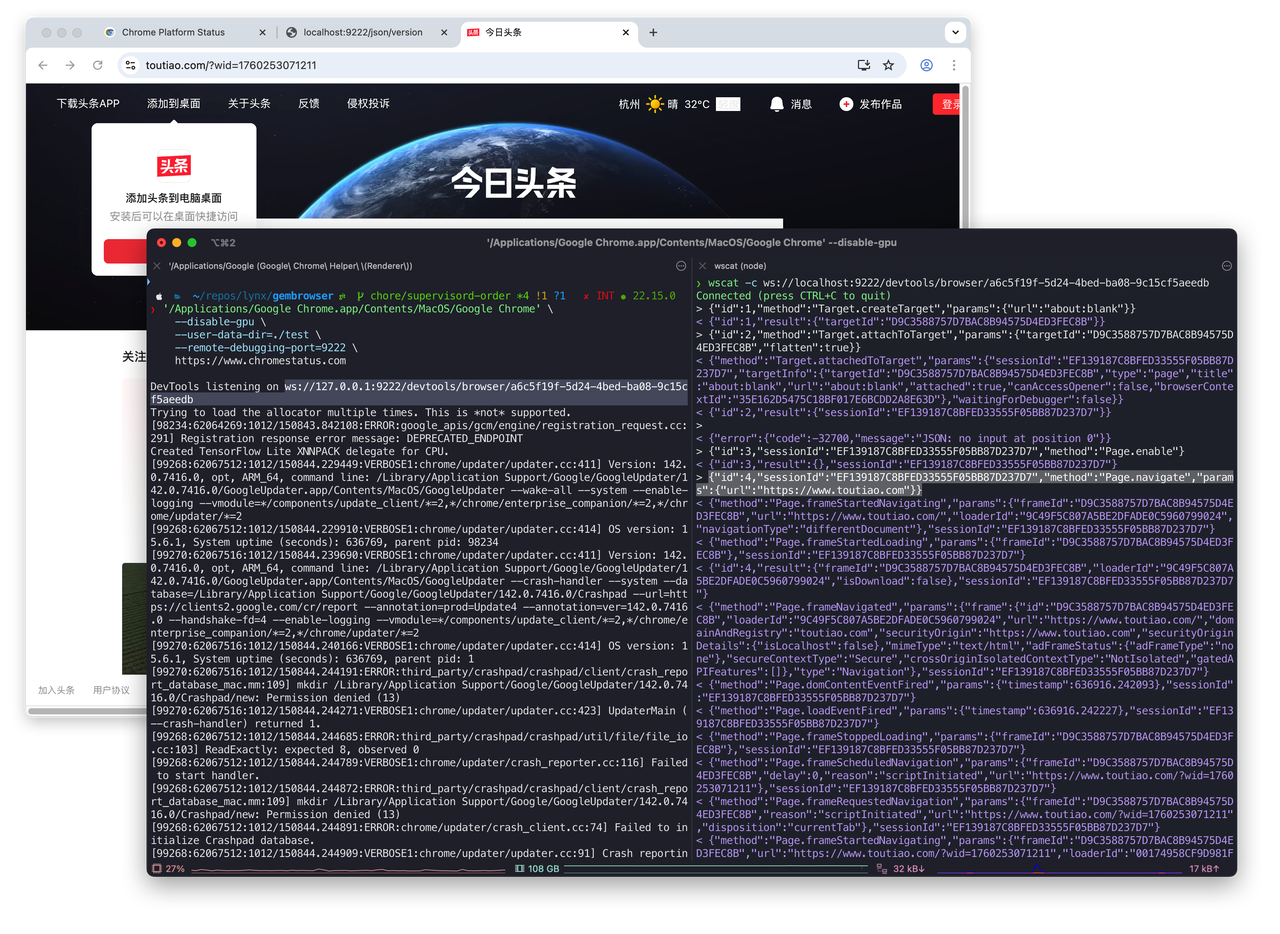
Note: AIO Sandbox doesn't directly expose the CDP interface
/json/version, but relays CDP through the uvicorn service and adds heartbeat detection to avoid ws disconnection issues.
GUI Visual Operations
Screenshots
Unlike CDP-based screenshots, visual screenshots /v1/browser/screenshot include Tabs (the entire browser window), and operations target the entire browser window.
| GUI Browser Screenshot (Tabs) | CDP-based Page Screenshot (Page) |
|---|---|
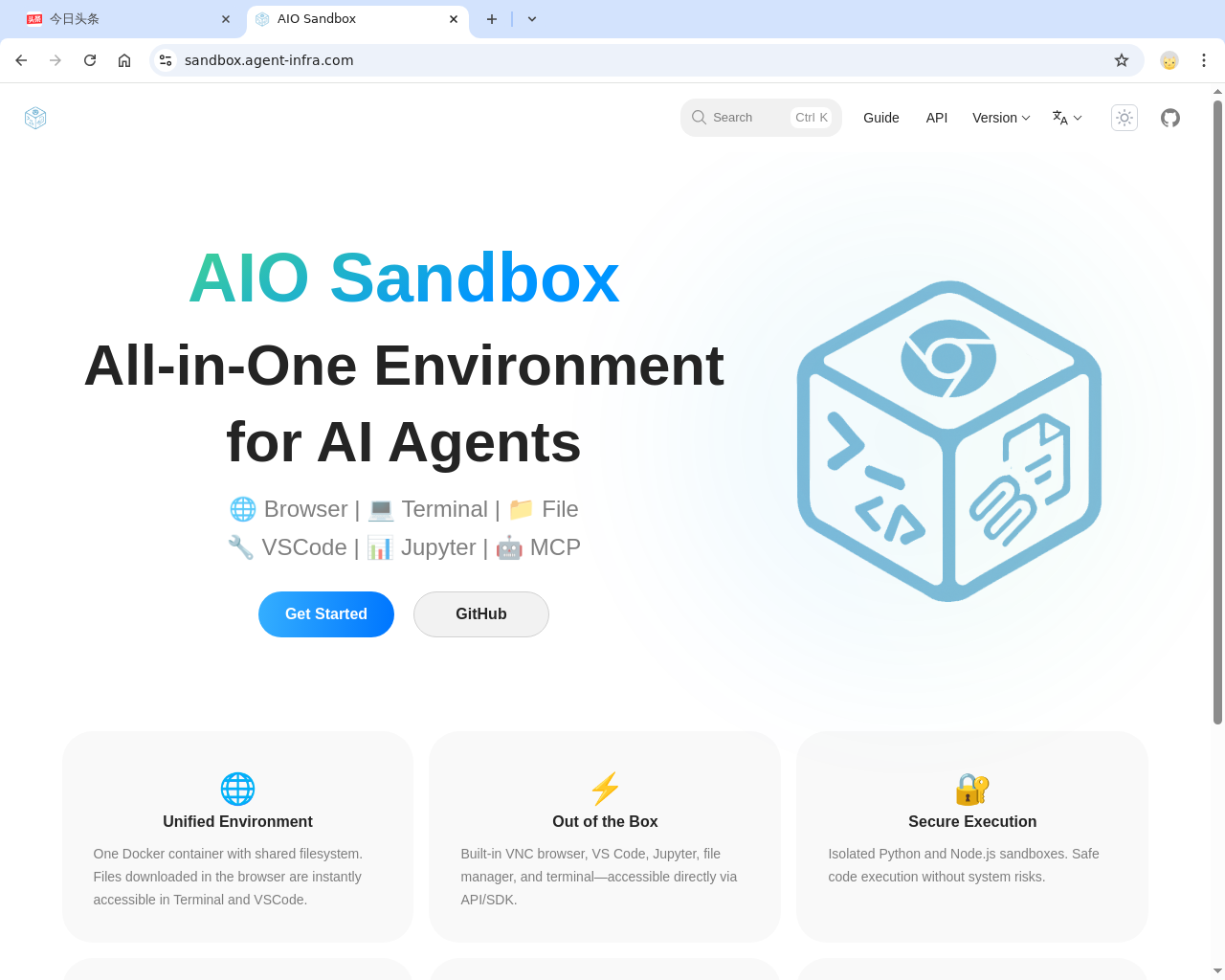 | 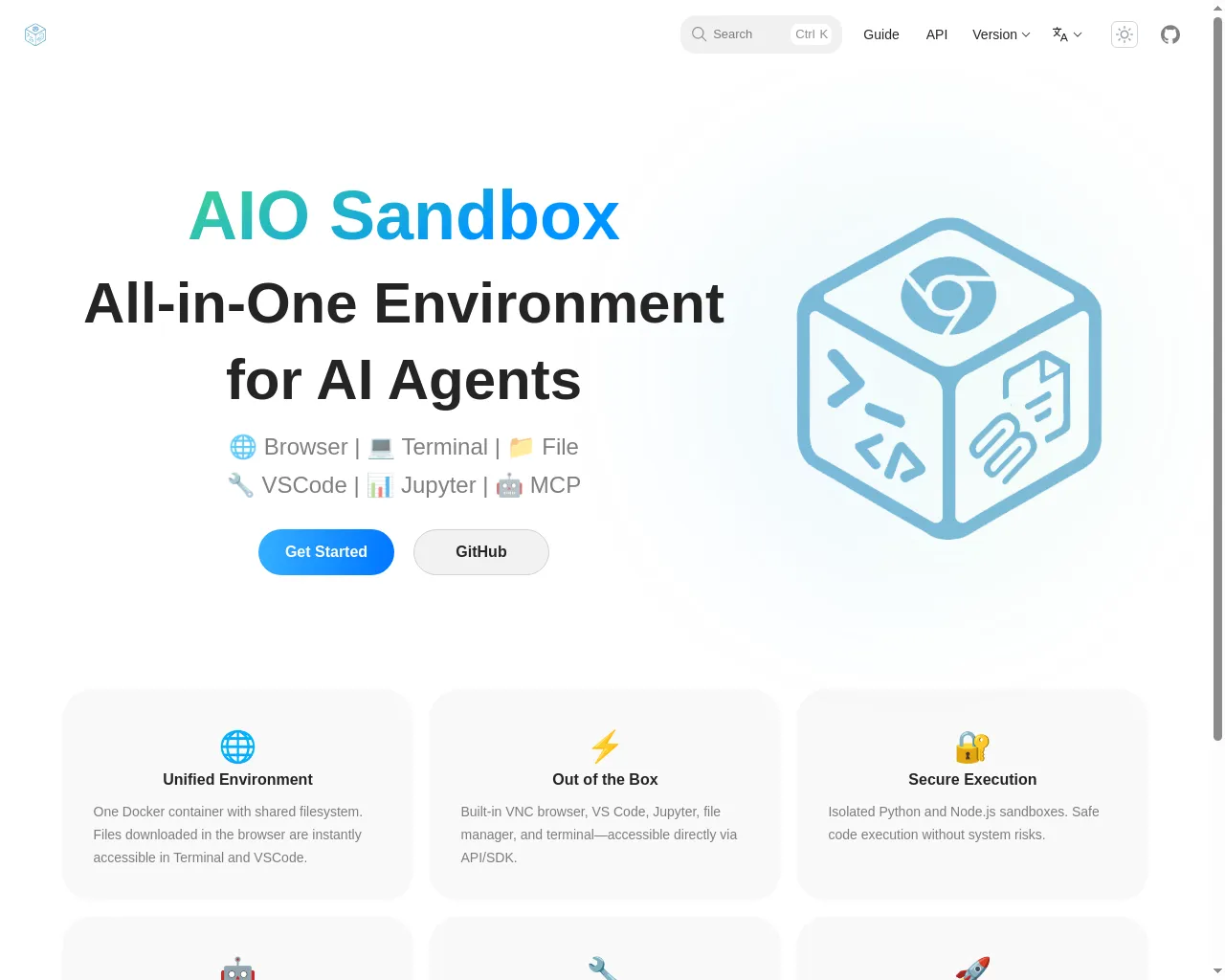 |
Unlike CDP browser operations, visual operations /v1/browser/actions simulate human behavior for clicking, typing, scrolling, etc., which can reduce target website risk control strategies.
Unified Action Space Abstract GUI operations into composable minimal atomic actions, such as moving mouse, clicking, dragging, scrolling, key press, text input, and additional utility functions like wait, aligning as closely as possible with VLM visual models executing actual actions.
Takeover
When Browser Use encounters login requirements, human takeover is generally needed, requiring an interactive browser interface. Currently there are two approaches:
- VNC Takeover: AIO Sandbox provides
/vnc/index.htmlpage for direct user interaction.

- Frontend connects via CDP, real-time redrawing complete browser interface on Canvas (Playground); we've packaged the frontend part into a component @agent-infra/browser-ui. Below, left is the actual browser, right is browser-ui screen mirroring:

The differences between the two takeover methods are roughly as follows:
Command Line Interpreter
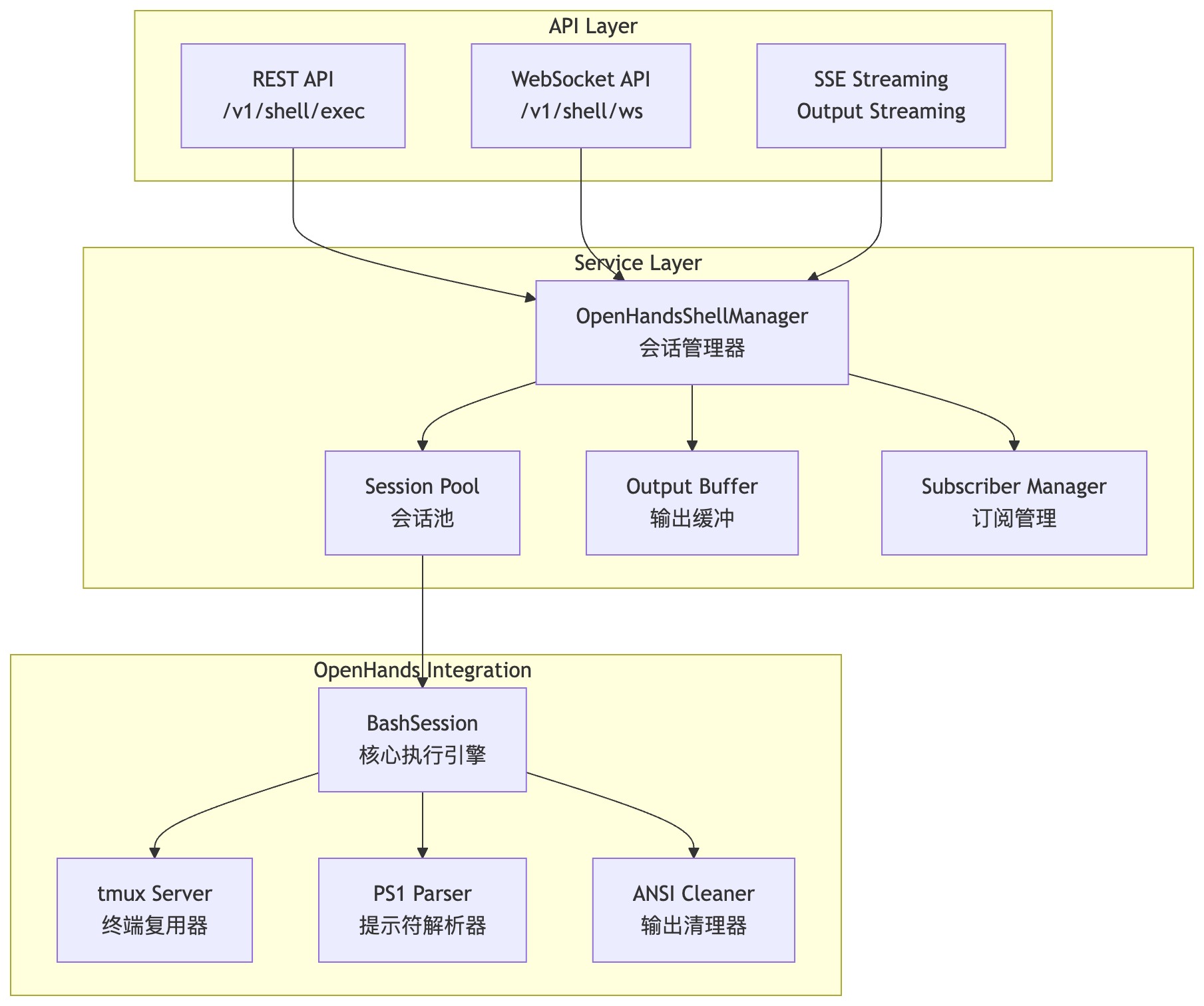
For Coding Agents, most tasks can be completed through command line execution. When designing the Shell module, using OpenHands' CmdRunAction as the execution engine, combined with tmux, implements multi-session execution capability.
File Operations
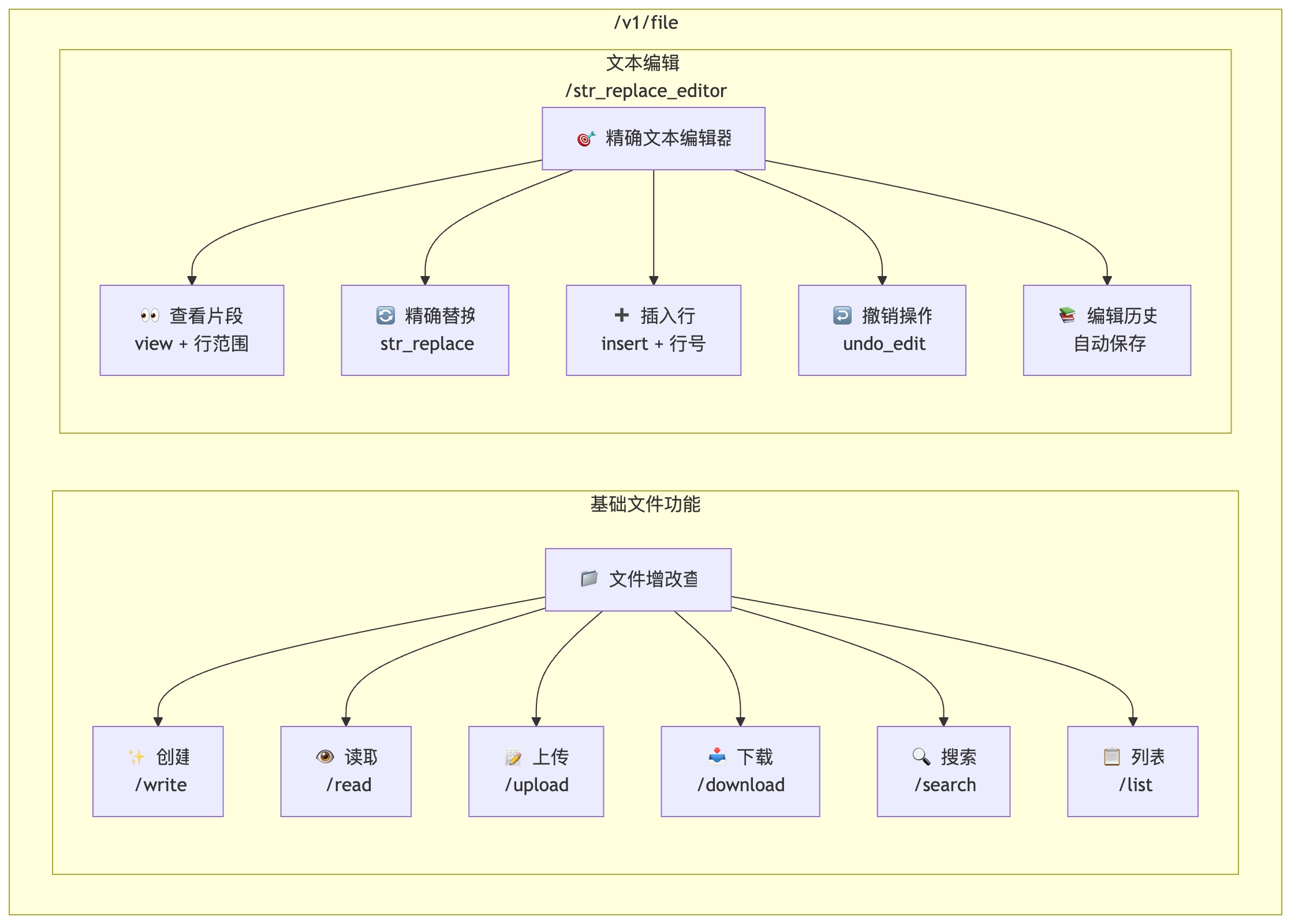
File/code editing only requires two tools:
-
File CRUD: Encapsulates basic I/O for file read/write/list directory/create/upload/download, with path validation and permission control, covering common file operation scenarios.
-
Text Editor: Implements model-oriented fine-grained editing tool str_replace_editor, supporting:
view(view file or directory, including line range)str_replace(exact string replacement)insert(insert by line, legacy version support)undo_edit(undo)
Code Execution
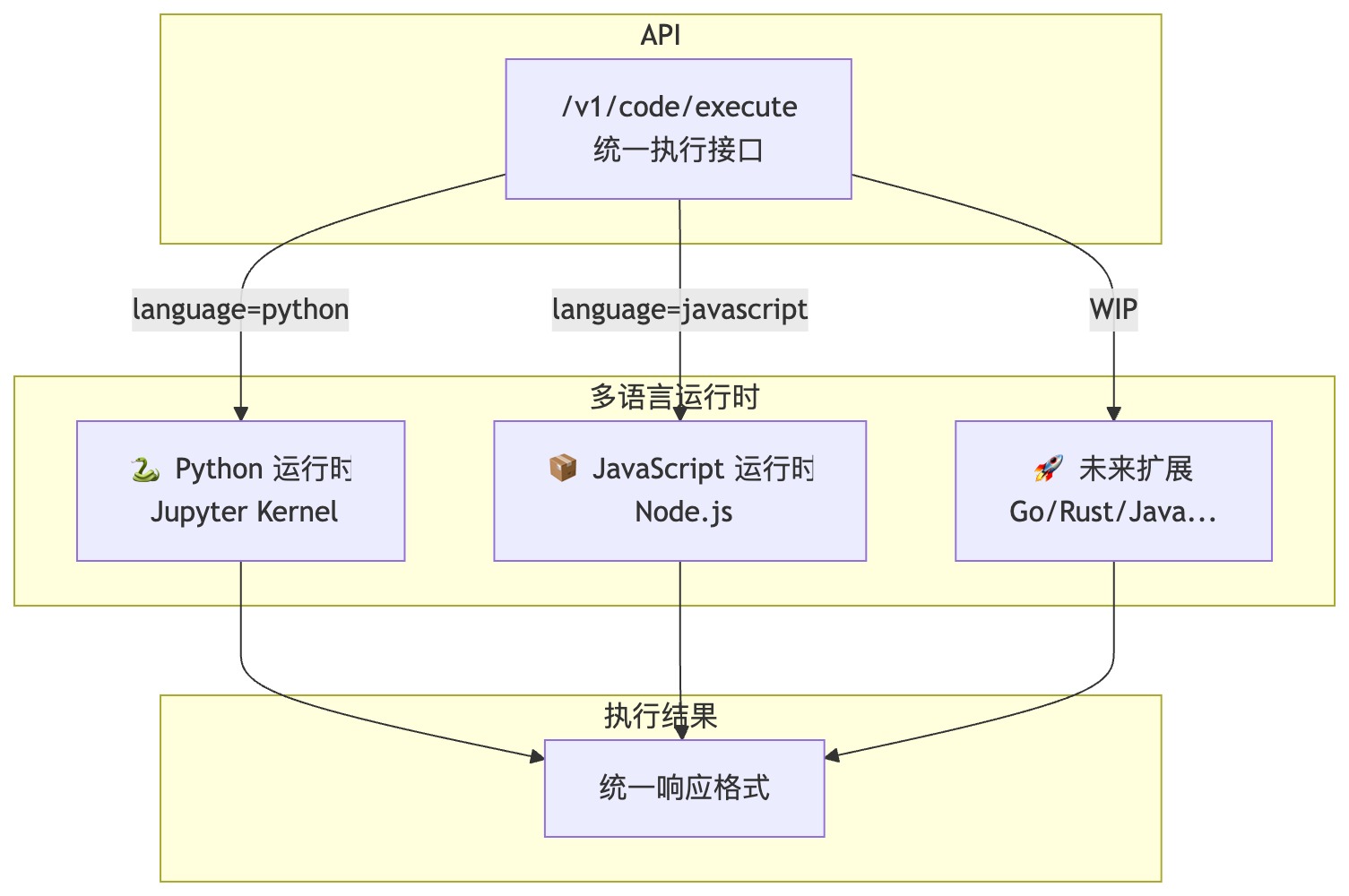
Balancing language coverage and image size, using Python 3.10/3.11/3.12 and Node.js 22 runtimes from Sandbox Fusion, providing an integrated secure isolation environment for code execution.
MCP Servers Aggregator
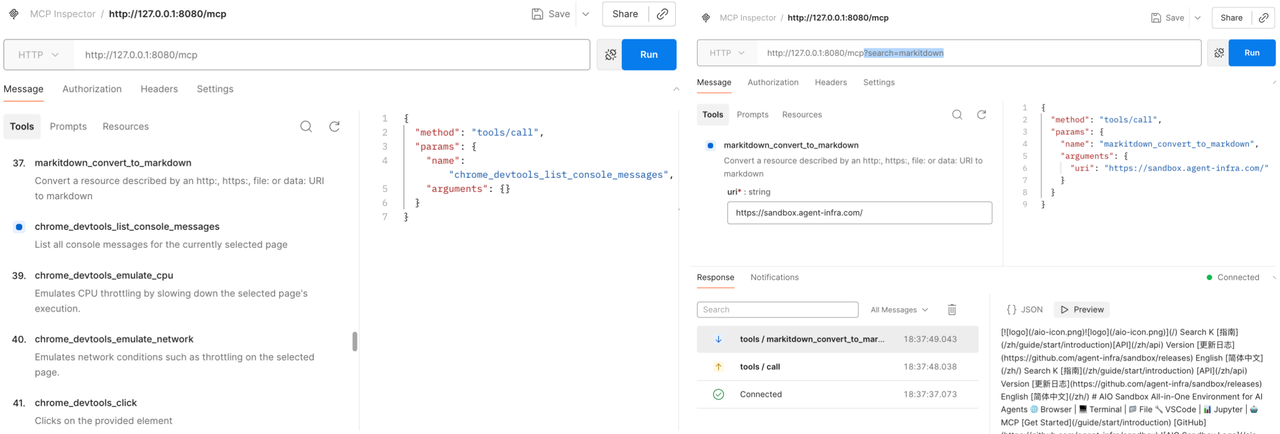
Aggregates multiple MCP Servers (e.g., chrome-devtools-mcp) through unified entry point /mcp, supporting parameter-level filtering, and allowing tool name prefixing (namespacing).
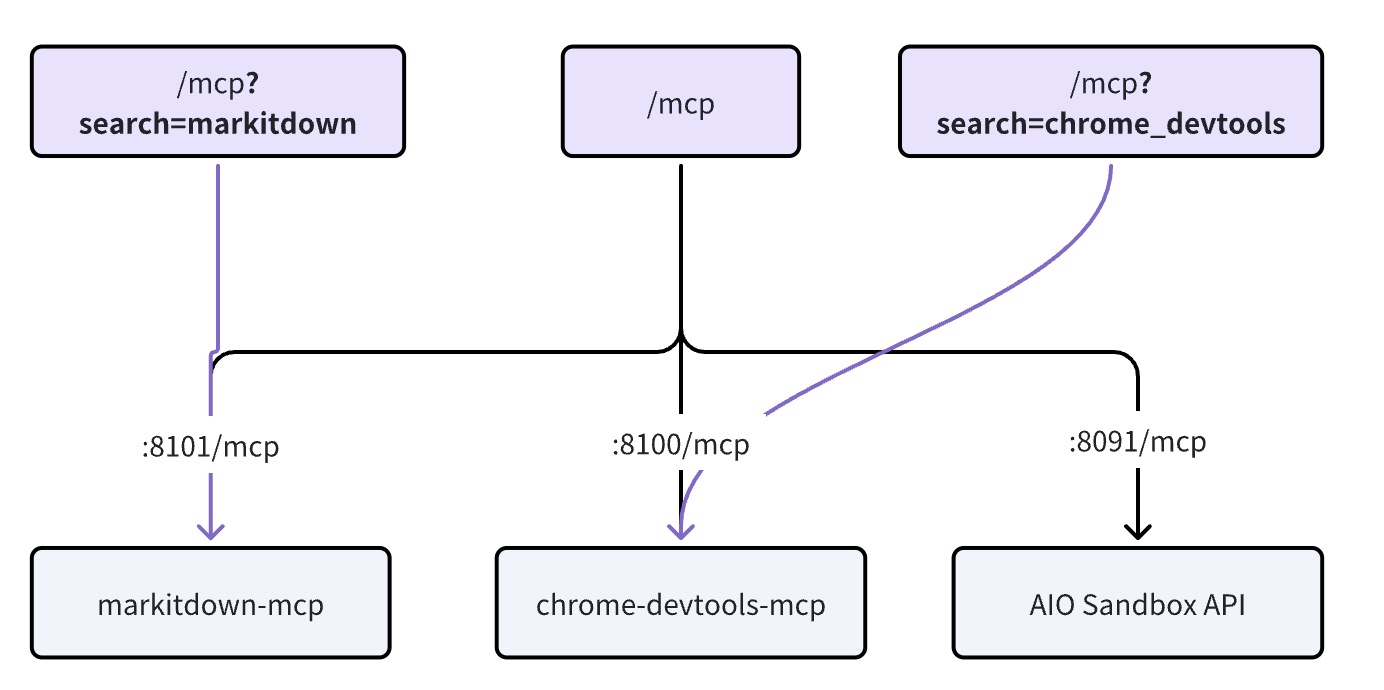
Filter MCP Servers by search, future expansion will include tags (tags) and category (category) multi-dimensional filtering to reduce redundant calls and lower model token costs.
Proxy
In Agent sandboxes, there are generally two types of scenarios corresponding to forward and reverse proxies:
-
Forward Proxy: Browser Use Agent can access private/global networks
-
Reverse Proxy: Coding Agent services developed inside the sandbox are exposed externally for user-side preview
Forward Proxy
Using TinyProxy proxy server to bypass geographic restrictions, access restricted content, or provide secure access within corporate intranets.
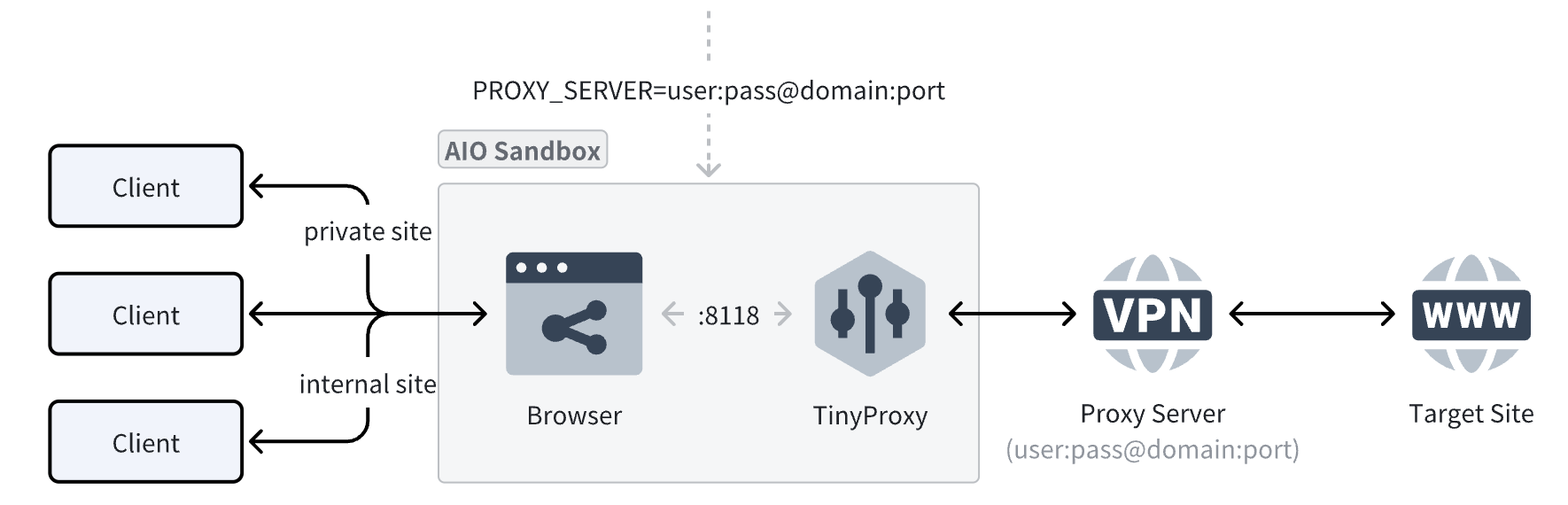
Why introduce TinyProxy when Chrome has --proxy-server to specify proxy?
The Chromium official documentation states that it will not use any username/password embedded in proxy settings (e.g., http://user:pass@host:port), authentication must go through a separate challenge dialog, affecting the entire Browser Use experience (as shown below):

Reverse Proxy
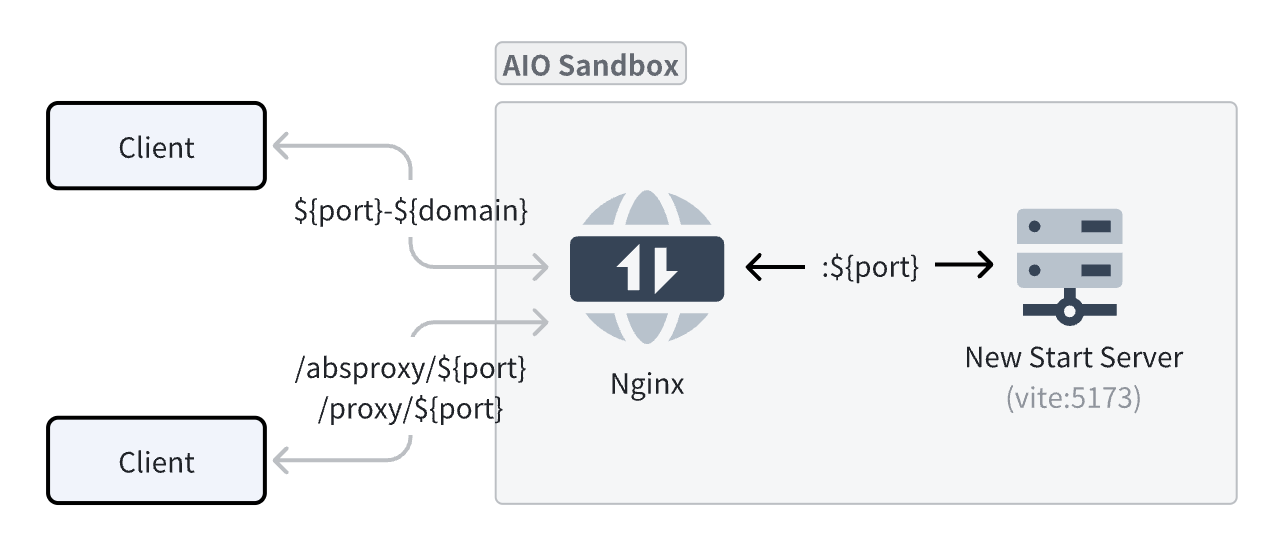 Provides two methods to access service ports inside the Sandbox:
-
subdomain wildcard forwarding (recommended): Any domain matching
${port}-${domain}format will be forwarded to ports inside the sandbox.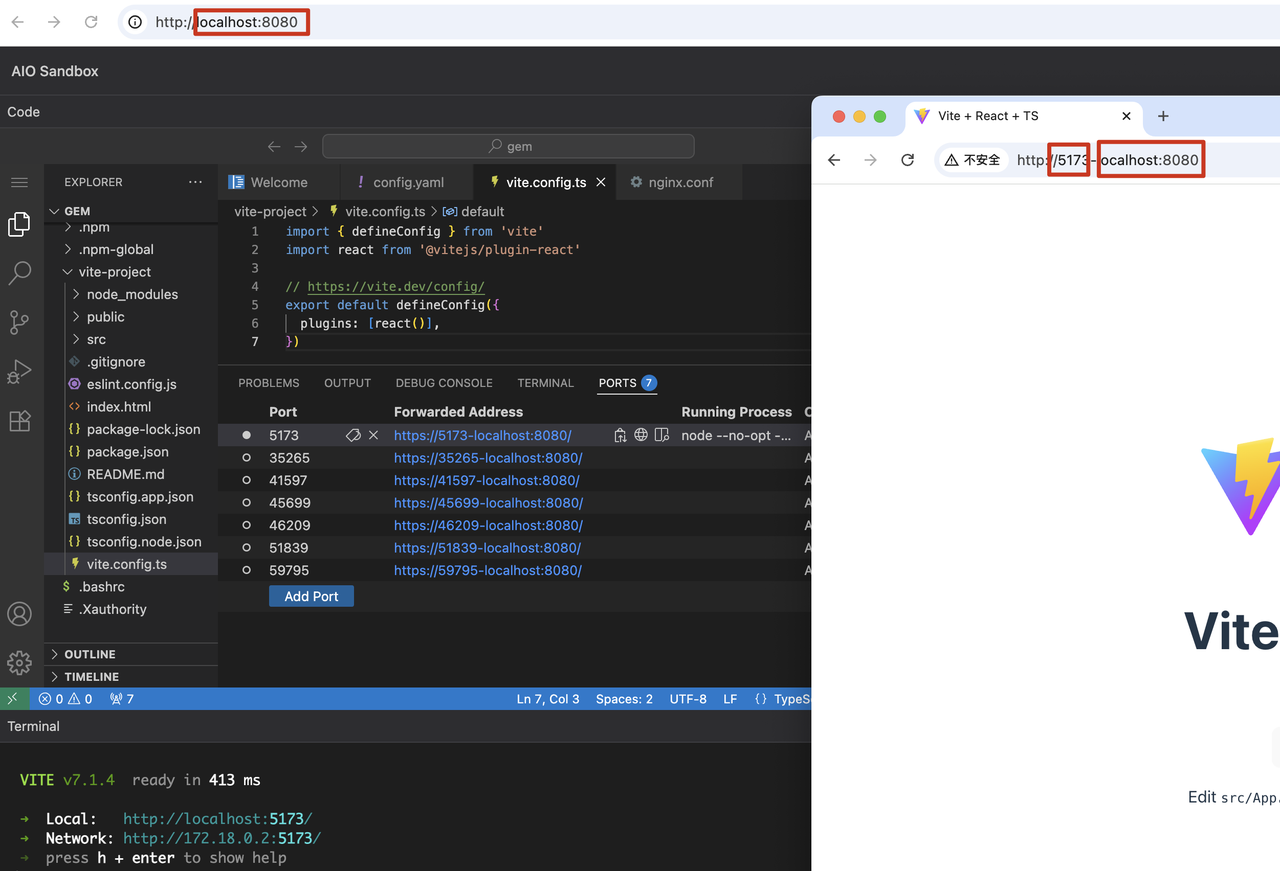
-
subpath forwarding: Encounters many issues: for routing-sensitive services (like frontend projects), the additional
/proxy|absproxy/${port}path causes resource matching 404s.
Authentication
Agent operations in the sandbox generate user data. To implement unified AIO Sandbox authentication without intrusion, without modifying any existing business routing configuration, and without increasing the mental burden of future routing configuration expansion, an "asymmetric encryption + JWT" reverse proxy architecture was designed at the internal Nginx gateway layer:

How to Enable (One-time Configuration)
- Generate key pair
- Start service (with public key to enable authentication), using environment variable
JWT_PUBLIC_KEY
Issue JWT
Business service uses private key to generate a JWT valid for 1 hour. Below is a simplified script to generate JWT, in practice business backend should use mature JWT libraries:
Usage
-
Header Authentication
-
Short-Lived Ticket Authentication Example (using VNC page access): Direct access cannot authenticate via Header method, can only use
?ticket=ticket as query parameter.- Use JWT to obtain ticket from common endpoint (default validity is 30s, can be configured via
TICKET_TTL_SECONDSenvironment variable)
- Client builds and uses VNC URL: Now you can use the obtained
${ticket}variable to build the VNC URL and initiate access.
- Use JWT to obtain ticket from common endpoint (default validity is 30s, can be configured via
Extension and Ecosystem
Custom Images
In AIO, service processes (supervisord) and service routing (Nginx) are automatically mounted following convention-based directories:
- Service process directory:
/opt/gem/supervisord/*.conf - Routing directory:
/opt/gem/nginx/*.conf
To customize services and routing on top of the AIO image, refer to the following image code:
SDK Integration
Using fern to convert AIO Sandbox API documentation directly into Python / Go / Node.js SDKs. Using Python as an example, a few lines of code connect AIO Sandbox's core functionality:
More usage examples: agent-infra/sandbox#examples
browser-use
Just add 4 lines of code to integrate the community's browser-use:
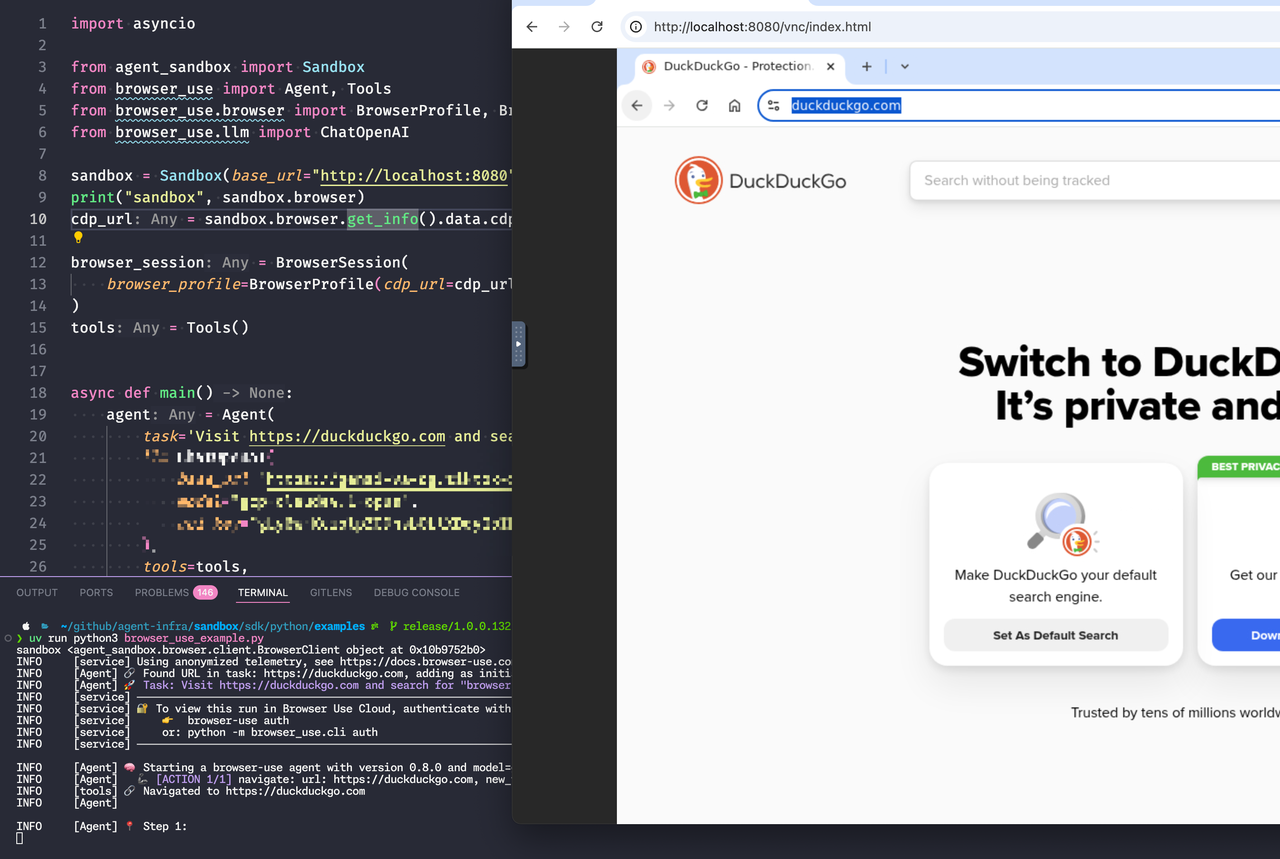
Complete code: browser-use#main.py
LangGraph-DeepAgents
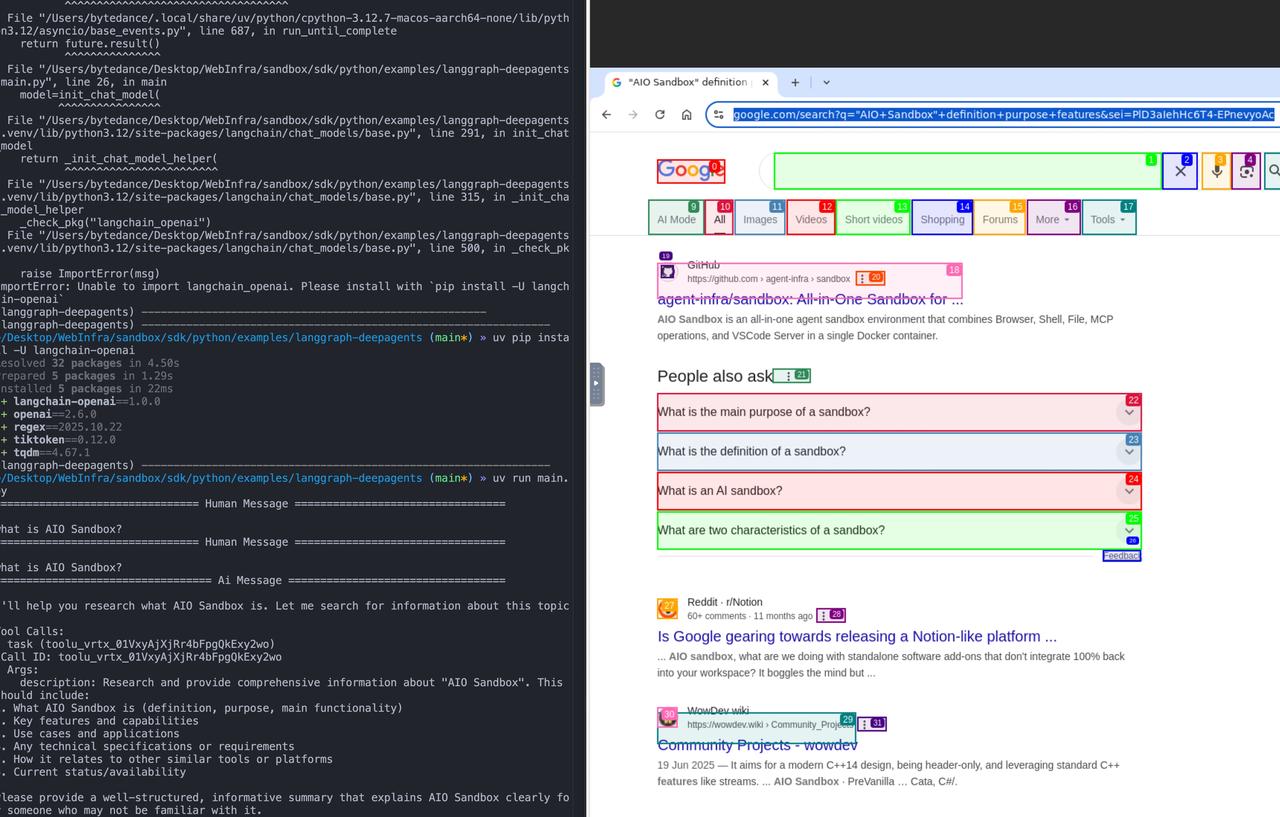
Complete code: langgraph-deepagents#main.py
Custom Toolsets
You can use API / SDK to compose high-level toolsets needed by Agents, for example link_reader returns page content for a URL:
Deployment
Currently the best public cloud deployment form is function computing, based on Sandbox's designated instance access capability: One-Click Deploy All-in-One Sandbox Application--Function Service-Volcano Engine
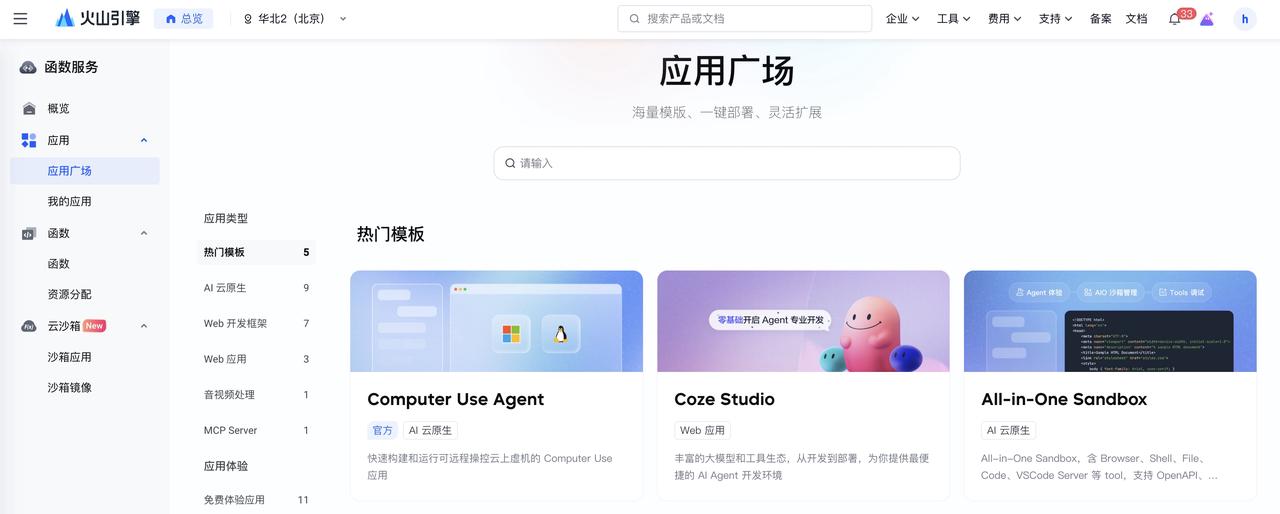
Summary and Outlook
AIO Sandbox provides an integrated, customizable base environment (Agent Env), enabling Agents to complete diverse tasks including browsing, executing code, running commands, and file operations within the same environment, while supporting customization of domain-specific sandboxes for different Agents. This sandbox system will continue to evolve and expand alongside the rising intelligence ceiling of Agents and the creativity of developers.
Going forward, we will continue to refine stability, observability, and ecosystem integration, continuously improve evaluation systems and best practices, driving robust deployment and efficient operation of AIO Sandbox in more large-scale, high-demand Agent application scenarios.
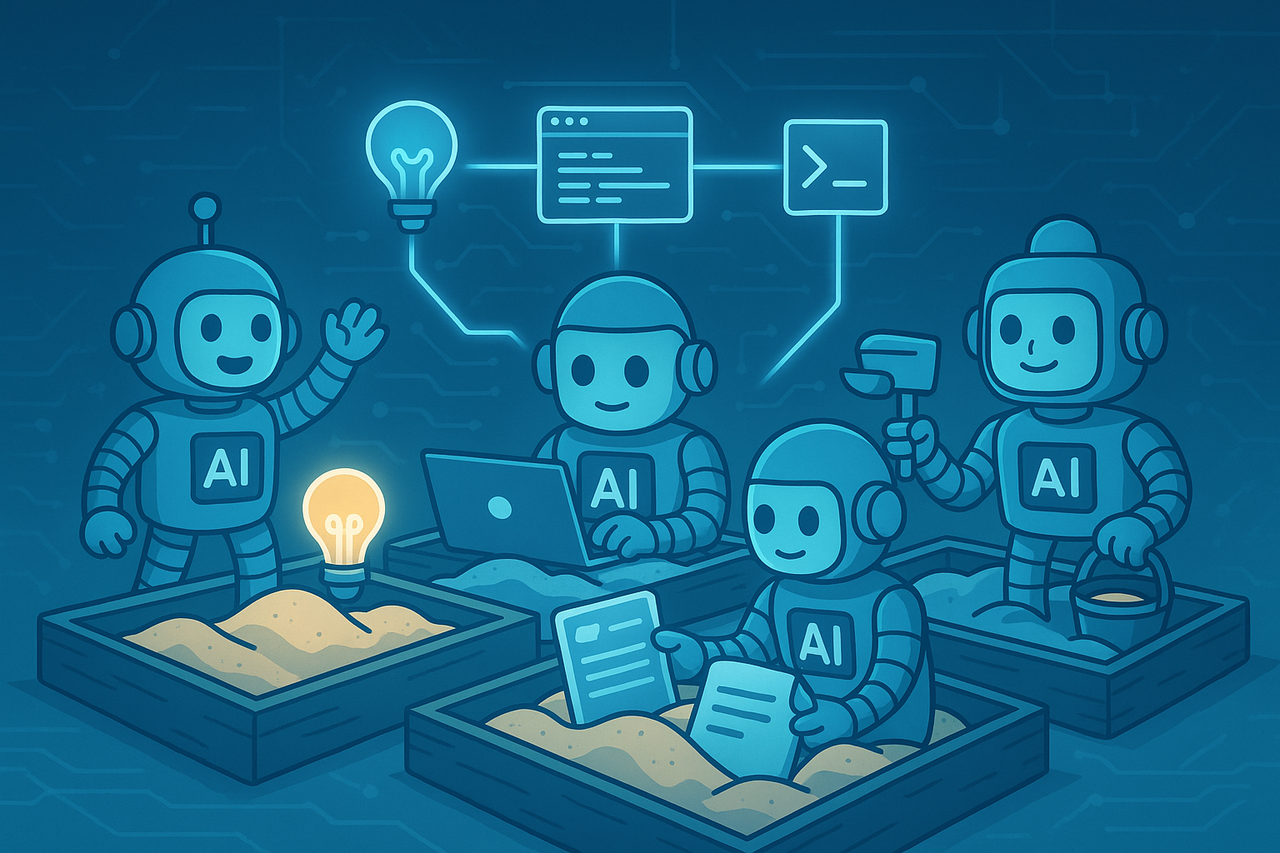
Appendix
Terminology
References
- UI-TARS-2 Technical Report: Advancing GUI Agent with Multi-Turn Reinforcement Learning
- AIO Sandbox: All-in-One Sandbox for AI Agents & Developers
- Agentic AI Infrastructure Practice Series (2): Necessity and Practice of Dedicated Sandbox Environment
- Writing effective tools for AI agents—using AI agents
- Unifying the Computer Use Action Space