
• English
  • MCP Integration

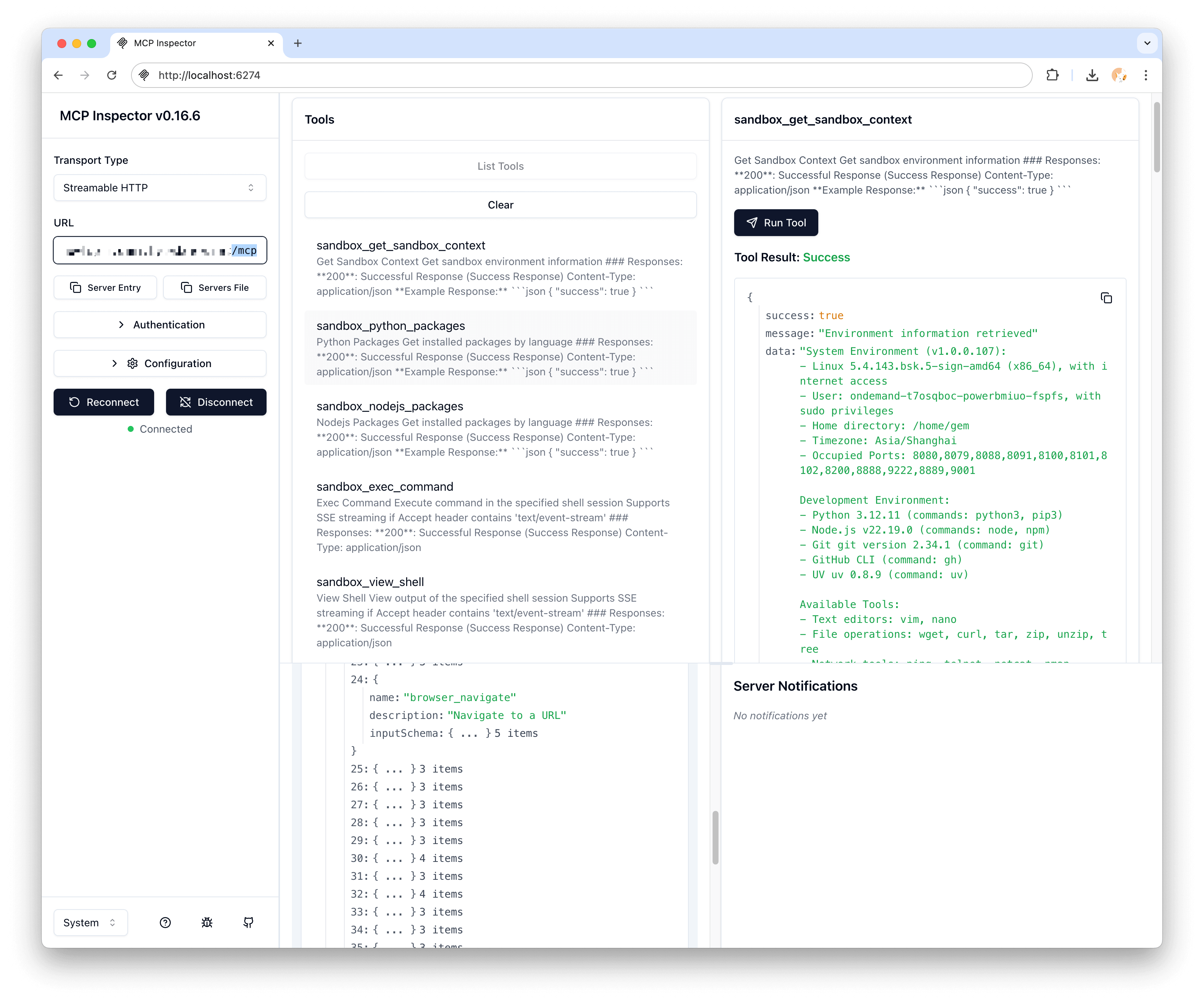
    The Model Context Protocol (MCP) Hub in AIO Sandbox provides a centralized interface for AI agents to access multiple services through a single endpoint.
    What is MCP?

    MCP (Model Context Protocol) is a standardized way for AI agents to interact with external tools and services. AIO Sandbox includes a pre-configured MCP Hub that aggregates multiple useful servers.

    Available MCP Servers

    Browser Server

    • Endpoint: Included in /mcp
    • Features: Web browsing, page interaction, screenshot capture
    • Use Cases: Web scraping, form filling, content extraction

    File Server

    • Endpoint: Included in /mcp
    • Features: File system operations, search, content manipulation
    • Use Cases: Code generation, file processing, data management

    Terminal Server

    • Endpoint: Included in /mcp
    • Features: Shell command execution, process management
    • Use Cases: Build automation, system administration, development workflows

    Markitdown Server

    • Endpoint: Included in /mcp
    • Features: Document conversion, markdown processing
    • Use Cases: Documentation generation, content transformation

    Accessing MCP Services

    HTTP Endpoint

    GET http://localhost:8080/mcp

    The MCP Hub supports streamable HTTP protocol for real-time communication.

    Connection Example

    import httpx
    import json
    
    async def query_mcp_hub():
        async with httpx.AsyncClient() as client:
            response = await client.post(
                "http://localhost:8080/mcp",
                json={
                    "method": "tools/call",
                    "params": {
                        "name": "browser_navigate",
                        "arguments": {
                            "url": "https://example.com"
                        }
                    }
                }
            )
            return response.json()

    JavaScript Example

    async function callMCPTool(toolName, args) {
        const response = await fetch('http://localhost:8080/mcp', {
            method: 'POST',
            headers: {
                'Content-Type': 'application/json'
            },
            body: JSON.stringify({
                method: 'tools/call',
                params: {
                    name: toolName,
                    arguments: args
                }
            })
        });
    
        return await response.json();
    }
    
    // Example usage
    const result = await callMCPTool('file_read', {
        path: '/tmp/example.txt'
    });

    Tool Categories

    Browser Tools

    • browser_navigate - Navigate to URL
    • browser_click - Click elements
    • browser_type - Type text
    • browser_screenshot - Capture screenshots
    • browser_extract - Extract page content

    File Tools

    • file_read - Read file contents
    • file_write - Write to files
    • file_list - List directory contents
    • file_search - Search file contents
    • file_replace - Replace text in files

    Terminal Tools

    • terminal_execute - Run shell commands
    • terminal_session - Manage terminal sessions
    • terminal_kill - Terminate processes
    • sandbox_execute_bash - Run Bash Pipe commands; supports the truncate parameter. It truncates large output by default. Set truncate: false to return full output. See Bash Pipe for details.

    Document Tools

    • markitdown_convert - Convert documents to markdown
    • markitdown_extract - Extract content from documents

    Agent Integration Patterns

    Basic Agent Setup

    import asyncio
    from openai import AsyncOpenAI
    
    class MCPAgent:
        def __init__(self, sandbox_url="http://localhost:8080"):
            self.sandbox_url = sandbox_url
            self.client = AsyncOpenAI()
    
        async def call_tool(self, tool_name, **kwargs):
            """Call an MCP tool through the sandbox"""
            async with httpx.AsyncClient() as client:
                response = await client.post(
                    f"{self.sandbox_url}/mcp",
                    json={
                        "method": "tools/call",
                        "params": {
                            "name": tool_name,
                            "arguments": kwargs
                        }
                    }
                )
                return response.json()
    
        async def browse_and_analyze(self, url):
            """Example: Browse a page and analyze content"""
            # Navigate to page
            await self.call_tool("browser_navigate", url=url)
    
            # Take screenshot
            screenshot = await self.call_tool("browser_screenshot")
    
            # Extract content
            content = await self.call_tool("browser_extract")
    
            # Save content to file
            await self.call_tool("file_write",
                               path="/tmp/content.txt",
                               content=content["text"])
    
            return {
                "screenshot": screenshot,
                "content": content,
                "saved_to": "/tmp/content.txt"
            }

    Error Handling

    Common Errors

    async def robust_mcp_call(tool_name, **kwargs):
        """MCP call with proper error handling"""
        try:
            response = await client.post(
                "http://localhost:8080/mcp",
                json={
                    "method": "tools/call",
                    "params": {
                        "name": tool_name,
                        "arguments": kwargs
                    }
                },
                timeout=30.0
            )
    
            if response.status_code != 200:
                raise Exception(f"MCP call failed: {response.status_code}")
    
            result = response.json()
    
            if "error" in result:
                raise Exception(f"Tool error: {result['error']}")
    
            return result
    
        except httpx.TimeoutException:
            raise Exception("MCP call timed out")
        except httpx.ConnectError:
            raise Exception("Cannot connect to MCP hub")
        except Exception as e:
            raise Exception(f"MCP call failed: {str(e)}")

    Retry Logic

    import asyncio
    import random
    
    async def retry_mcp_call(tool_name, max_retries=3, **kwargs):
        """MCP call with exponential backoff retry"""
        for attempt in range(max_retries):
            try:
                return await robust_mcp_call(tool_name, **kwargs)
            except Exception as e:
                if attempt == max_retries - 1:
                    raise e
    
                # Exponential backoff with jitter
                delay = (2 ** attempt) + random.uniform(0, 1)
                await asyncio.sleep(delay)

    Performance Optimization

    Connection Pooling

    import httpx
    
    class OptimizedMCPClient:
        def __init__(self, sandbox_url, max_connections=10):
            self.sandbox_url = sandbox_url
            self.client = httpx.AsyncClient(
                limits=httpx.Limits(max_connections=max_connections),
                timeout=httpx.Timeout(30.0)
            )
    
        async def call_tool_batch(self, calls):
            """Execute multiple MCP calls concurrently"""
            tasks = []
            for tool_name, kwargs in calls:
                task = self.call_tool(tool_name, **kwargs)
                tasks.append(task)
    
            return await asyncio.gather(*tasks, return_exceptions=True)
    
        async def close(self):
            await self.client.aclose()

    Caching

    from functools import lru_cache
    import hashlib
    
    class CachedMCPClient:
        def __init__(self):
            self._cache = {}
    
        def _cache_key(self, tool_name, **kwargs):
            """Generate cache key for tool call"""
            content = f"{tool_name}:{sorted(kwargs.items())}"
            return hashlib.md5(content.encode()).hexdigest()
    
        async def cached_call_tool(self, tool_name, ttl=300, **kwargs):
            """Call tool with caching"""
            cache_key = self._cache_key(tool_name, **kwargs)
    
            # Check cache
            if cache_key in self._cache:
                cached_result, timestamp = self._cache[cache_key]
                if time.time() - timestamp < ttl:
                    return cached_result
    
            # Make actual call
            result = await self.call_tool(tool_name, **kwargs)
    
            # Cache result
            self._cache[cache_key] = (result, time.time())
    
            return result

    Security Considerations

    Safe Tool Execution

    ALLOWED_TOOLS = [
        'browser_navigate', 'browser_extract', 'browser_screenshot',
        'file_read', 'file_write', 'file_list',
        'markitdown_convert'
    ]
    
    RESTRICTED_TOOLS = [
        'terminal_execute',  # Requires validation
        'file_delete',       # Requires confirmation
    ]
    
    async def safe_tool_call(tool_name, **kwargs):
        """Safely execute MCP tools with validation"""
        if tool_name not in ALLOWED_TOOLS:
            if tool_name in RESTRICTED_TOOLS:
                # Additional validation required
                if not await validate_restricted_call(tool_name, **kwargs):
                    raise Exception(f"Restricted tool call not allowed: {tool_name}")
            else:
                raise Exception(f"Unknown tool: {tool_name}")
    
        return await call_tool(tool_name, **kwargs)
    
    async def validate_restricted_call(tool_name, **kwargs):
        """Validate restricted tool calls"""
        if tool_name == 'terminal_execute':
            command = kwargs.get('command', '')
            # Block dangerous commands
            dangerous_patterns = ['rm -rf', 'dd if=', 'mkfs', '> /dev/']
            return not any(pattern in command for pattern in dangerous_patterns)
    
        return False

    Monitoring and Debugging

    Logging MCP Calls

    import logging
    
    logging.basicConfig(level=logging.INFO)
    logger = logging.getLogger(__name__)
    
    async def logged_mcp_call(tool_name, **kwargs):
        """MCP call with comprehensive logging"""
        start_time = time.time()
    
        logger.info(f"MCP call starting: {tool_name} with args {kwargs}")
    
        try:
            result = await call_tool(tool_name, **kwargs)
            duration = time.time() - start_time
    
            logger.info(f"MCP call completed: {tool_name} in {duration:.2f}s")
            return result
    
        except Exception as e:
            duration = time.time() - start_time
            logger.error(f"MCP call failed: {tool_name} in {duration:.2f}s - {str(e)}")
            raise

    Next Steps

    • Browser Integration - Learn about browser automation capabilities
    • Skills - Register and inspect reusable agent tool packages
    • AIO CLI - Call MCP tools from inside the sandbox
    • API Reference - Detailed API documentation
    • Examples - Real-world agent integration examples